
In this guide, we will provide you with the Alldocube USB Drivers. This guide will comprise various Alldocube devices whose USB drivers we have tried to put up. It can be any device of Android origin. If you want to do something on your device that requires you to connect through a PC, the first thing you need is USB drivers.
Usually, these days, when major devices are connected to a PC, the USB driver will be detected and installed automatically. However, it may happen that you’re using a device that doesn’t have USB drivers. Also, some issues may occur, and you’ll not be able to install the USB drivers. There where this guide will come in handy. Third means you have to install the USB driver manually. So, check out our guide.
Download Latest Alldocube USB Drivers
Here is a list of some of the Alldocube devices and their USB drivers. Download the one which you need.!!
| Device Name | USB Driver Download Link |
| Alldocube iPlay 40 | Download |
| Alldocube iPlay 30 | Download |
| Alldocube iPlay 20 Pro | Download |
| Alldocube iPlay 20 | Download |
| Alldocube X Neo | Download |
| Alldocube M5X Pro | Download |
| Alldocube iPlay10Pro | Download |
| Alldocube iPlay8 Pro | Download |
| Alldocube M8 | Download |
| Alldocube M5XS | Download |
| Alldocube M5X | Download |
| Alldocube M5 | Download |
| Alldocube M5 S | Download |
| Alldocube KNote | Download |
| Alldocube Power M3 | Download |
| Alldocube Free Young X5 | Download |
| Alldocube iPlay8 | Download |
| Alldocube iPlay 10 | Download |
| Alldocube Freer X9 | Download |
| Alldocube iWork8 Air Pro | Download |
| Alldocube Free Young X7 | Download |
| Alldocube iWork11 Flagship | Download |
| Alldocube T10 | Download |
| Alldocube T12 | Download |
| Alldocube i9 | Download |
| Alldocube MIX Plus | Download |
| Alldocube iWork1X | Download |
| Alldocube WP10 | Download |
| Alldocube iWork8 Air | Download |
| Alldocube iWork12 | Download |
| Alldocube iWork10 Flagship Ultrabook | Download |
| Alldocube iWork10 Ultimate | Download |
| Alldocube iPlay X9 U63 | Download |
| Alldocube i6 Air 3G Dual OS | Download |
| Alldocube iWork11 Stylus | Download |
| Alldocube T8S | Download |
| Alldocube T8 Plus 4G | Download |
| Alldocube iWork 8 Ultimate | Download |
| Alldocube T8 | Download |
| Alldocube i7 Stylus | Download |
| Alldocube T6 4G | Download |
| Alldocube i10 | Download |
| Alldocube i7 Remix | Download |
| Alldocube Knote 8 | Download |
| Alldocube i10 | Download |
| Alldocube i6 | Download |
| Alldocube X | Download |
| Alldocube X1 | Download |
| Alldocube iWork10 | Download |
| Alldocube T9 | Download |
| Alldocube Talk 8X | Download |
| Alldocube T7 4G | Download |
| Alldocube Talk 8H | Download |
| Alldocube Talk T8 | Download |
| Alldocube Talk 79U55GT-C8 | Download |
| Alldocube Talk 10U31 GT | Download |
| Alldocube U25GT Super Edition | Download |
| Alldocube Talk 7X C8 | Download |
| Alldocube Talk 9X | Download |
| Alldocube iWork10U100GT | Download |
| Alldocube Talk7XU51GT-C4 | Download |
| Alldocube U30GT2 | Download |
| Alldocube U55GT-C4 | Download |
| Alldocube iPlay 80 Mini Ultra | Download |
| Alldocube iPlay 70 Max Pro 4G | Download |
| Alldocube iPlay 70 Pad Pro | Download |
| Alldocube Palm Play Mini 4 Ultra | Download |
| Alldocube iPlay 70S | Download |
| Alldocube iPlay 70 Pro | Download |
| Alldocube iPlay 70 Mini Ultra | Download |
| Alldocube iPlay 70 Mini Pro | Download |
| Alldocube Ultra Pad | Download |
| Alldocube iPlay 60 Mini | Download |
| Alldocube iPlay 70 | Download |
| Alldocube iPlay 70 Max Pro 5G | Download |
| Alldocube iPlay 70E | Download |
| Alldocube iPlay 60 Lite | Download |
| Alldocube iPlay 60 Plus | Download |
| Alldocube CoolPlay Pad Pro | Download |
| Alldocube iPlay 60 Mini Pro | Download |
| Alldocube iPlay 60S | Download |
| Alldocube Palm Play Mini 2 4G | Download |
| Alldocube Palm Play Mini 2 5G | Download |
| Alldocube iPlay 60 Pro | Download |
| Alldocube iPlay 60 Pad Pro | Download |
| Alldocube iPlay 60 OLED | Download |
| Alldocube iPlay 50S | Download |
| Alldocube iPlay 50 SE | Download |
| Alldocube X Pad | Download |
| Alldocube iPlay 50 Mini | Download |
| Alldocube Pad 50 Pro | Download |
| Alldocube iPlay 50 2023 | Download |
| Alldocube iPlay 50 Mini Lite | Download |
| Alldocube iPlay 50 Lite | Download |
| Alldocube iPlay 60 | Download |
| Alldocube iPlay 50 Mini Pro | Download |
| Alldocube iPlay 9T | Download |
| Alldocube iNote | Download |
| Alldocube iPlay 50 | Download |
| Alldocube iPlay 50 Pro | Download |
| Alldocube iPlay 20s | Download |
| Alldocube iPlay 40H | Download |
| Alldocube iPlay 40 Pro | Download |
| Alldocube iPlay 20P | Download |
| Alldocube kPad | Download |
| Alldocube X Game | Download |
| Alldocube iPlay 40 5G | Download |
| Alldocube Smile X | Download |
| Alldocube iPlay 30 Pro | Download |
| Alldocube iPlay 8T | Download |
How to Install USB Driver
1. First of all, install the Android SDK on your computer. You can download it here.
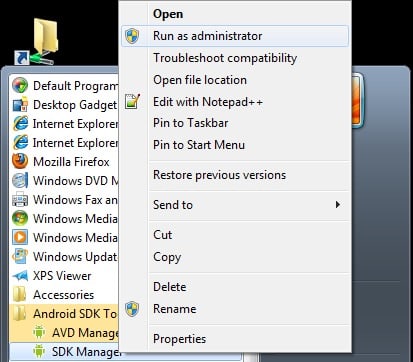
2. After installing the Android SDK, go to the Start menu. Select Android SDK Tools -> SDK Manager. Right-click on it and select Run as Administrator
Note: Please make sure to run SDK Manager in administrator mode. Otherwise, you will face trouble in installing new components.
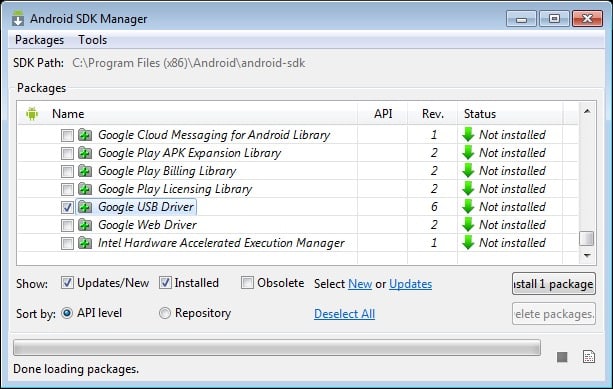
3. In the SDK Manager, select EXTRAS. There, you need to select the Google USB driver and then click Install 1 package.
4. When the installation is complete, plug in your Android device.
5. Open Device Manager on your PC. You can do so by searching “Device Manager” in the search bar. Here, select the Android phone, right-click, and select Update driver software
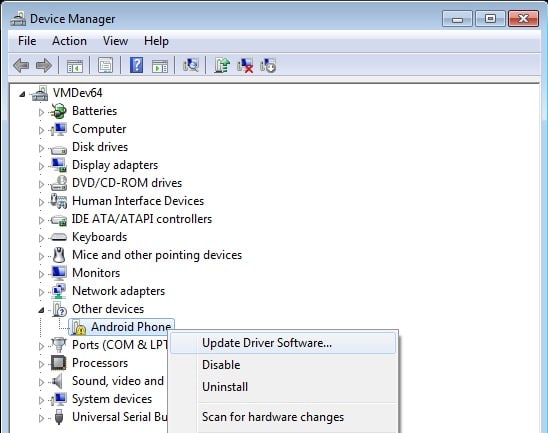
6. A new dialogue box will appear; select “Browse my computer for driver software” from the options.
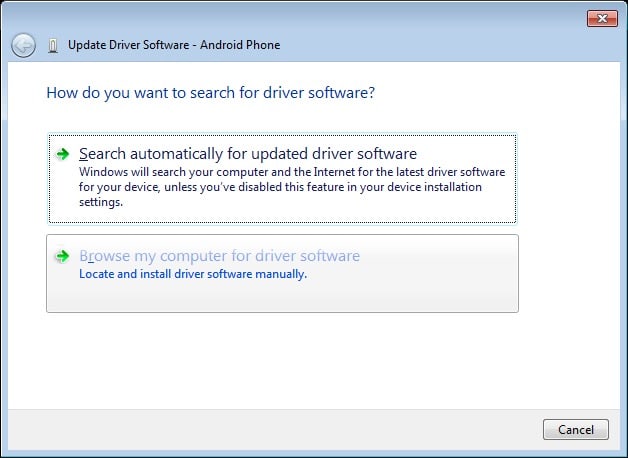
7. Now select the “Let me pick from a list of device drivers on my computer” option.
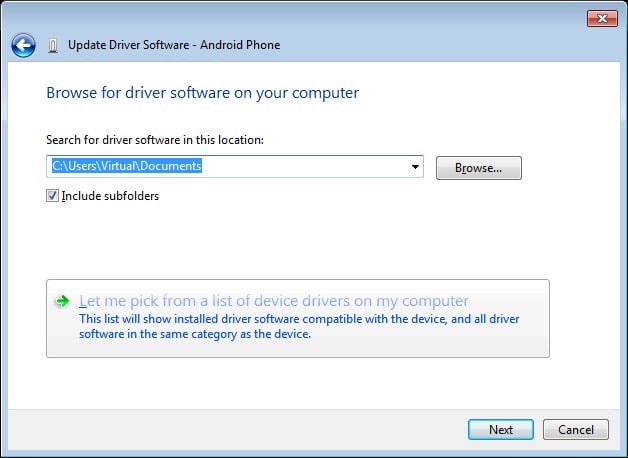
8. Select “Show All Devices” from the drop-down menu.
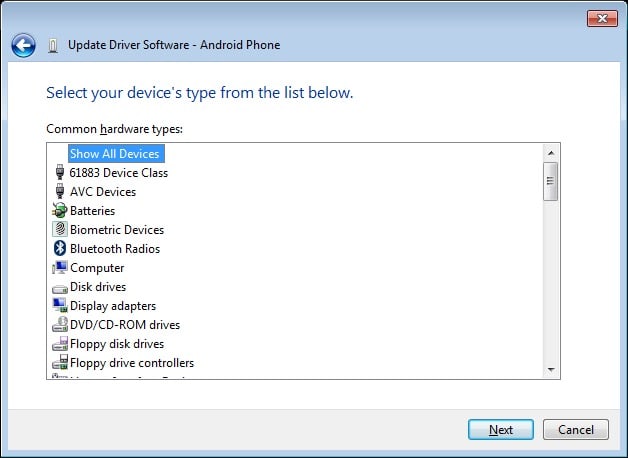
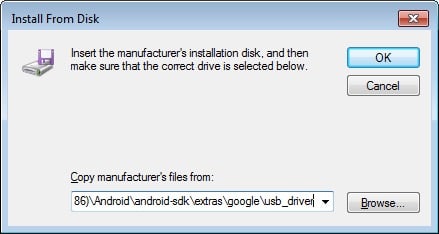
9. Click on the “have disk” button
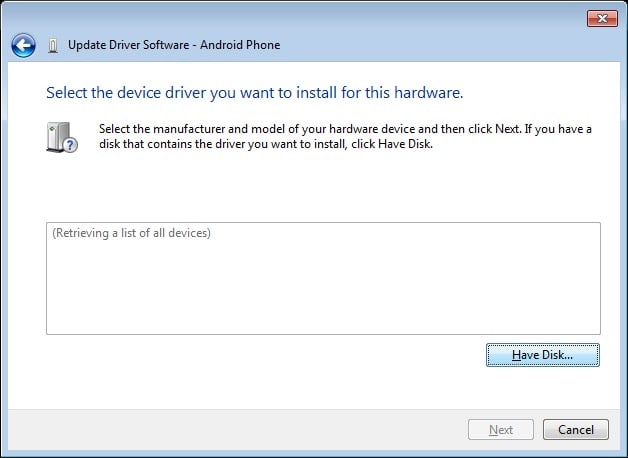
10. Enter the path for the Google USB driver.
C:\Program Files (x86)\Android\android-sdk\extras\google\usb_driver
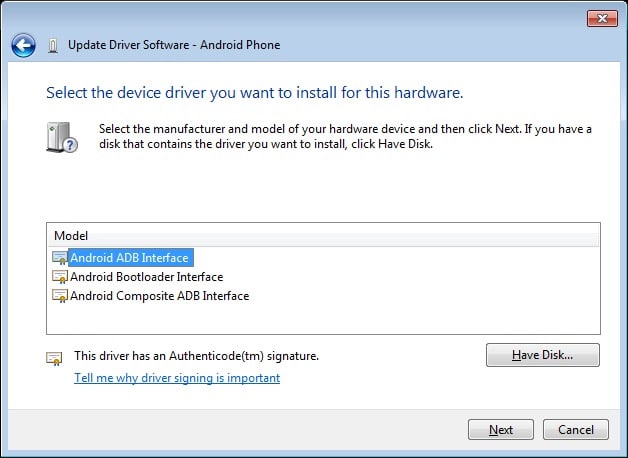
11. Select “Android ADB Interface” from the list of devices.
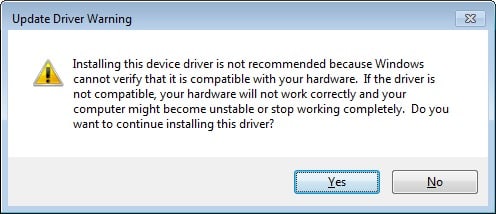
12. Confirm the Android USB driver installation by pressing the “Yes” button.
13. Press Install.
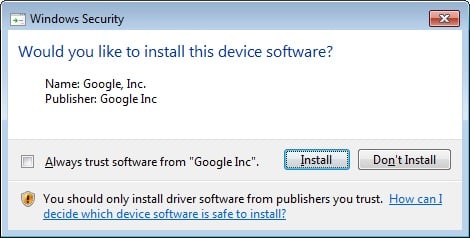
14. Now the installation is complete. You can click on the close button to terminate the installation wizard.
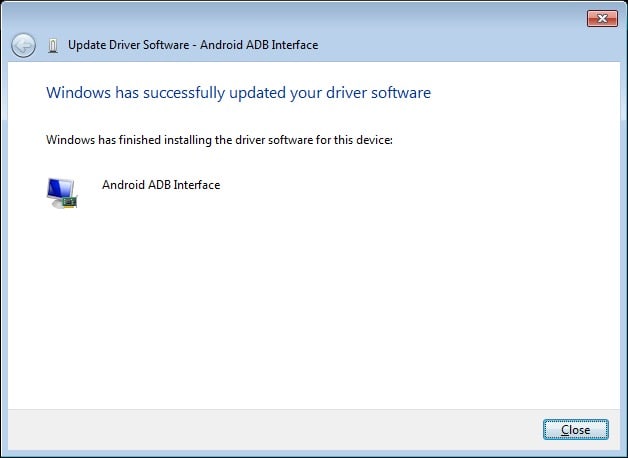
So, that’s all. Now you’ve successfully installed the Alldocube USB Drivers. We hope this guide was helpful to you.