Auto SR now works on the built-in screen of the ROG Xbox Ally X and Xbox Ally X20. Here is how to turn it on, which settings to pick, and when to use it.
Abd Razaaq
Published ·5 min read
Share
Your ROG Xbox Ally X can now use AI upscaling on its own screen, even in games that have no upscaling option at all. The feature is called Auto SR (Automatic Super Resolution), and after months as a docked-only preview, it now works in handheld mode on both the ROG Xbox Ally X and the newer Xbox Ally X20.
This guide explains what Auto SR does, which handhelds support it, and how to turn it on step by step.
Quick answer
Press the Xbox button, open the Display widget in Game Bar, go to the Graphics tab and turn on Auto SR: Xbox. Then lower the game resolution to 1600 x 900 or 1280 x 720 on the General tab and launch your game.
What is Auto SR?
Auto SR is Microsoft’s automatic super resolution for Windows. The game renders at a lower resolution, which is easier on the GPU, and an AI model upscales each frame so the picture looks sharper than the resolution it was rendered at.
What makes it different from FSR or RSR is where the work happens. Auto SR runs on the NPU inside the AMD Ryzen AI Z2 Extreme chip, alongside the GPU. Microsoft explains in its DirectX Developer Blog post that this lets it use a larger upscaling model without eating into the GPU’s frame time, in exchange for one frame of latency.
Advertisement
It is also built into Windows, so it can be applied to games that never shipped with their own upscaler.
What changed with the latest update?
When the preview started in April 2026, Auto SR only worked while the handheld was docked to an external display. That limit is now gone. With the November 2026 release:
Auto SR works on the built-in screen, including on battery.
It accepts games running at 1080p, not only 900p and 720p.
A new Performance mode raises the frame-rate ceiling to 120 FPS.
The feature has left preview on the ROG Xbox Ally X and Xbox Ally X20.
Performance mode is rolling out gradually through Windows updates, so it may not appear on every device on the same day.
Advertisement
Which handhelds support Auto SR?
Auto SR needs an NPU, and that decides everything.
Handheld
Chip
Auto SR
ROG Xbox Ally X
Ryzen AI Z2 Extreme (with NPU)
Yes
Xbox Ally X20
Ryzen AI Z2 Extreme (with NPU)
Yes
ROG Xbox Ally (base model)
Ryzen Z2 A (no NPU)
No
How to enable Auto SR on the ROG Xbox Ally X and X20
Step 1: Update everything
Auto SR arrives through updates, so start there.
Run Windows Update and install everything on offer.
Update Armoury Crate SE and your graphics driver.
Open the Microsoft Store and update Game Bar and the Automatic Super Resolution package from the Downloads page.
Step 2: Turn on Auto SR
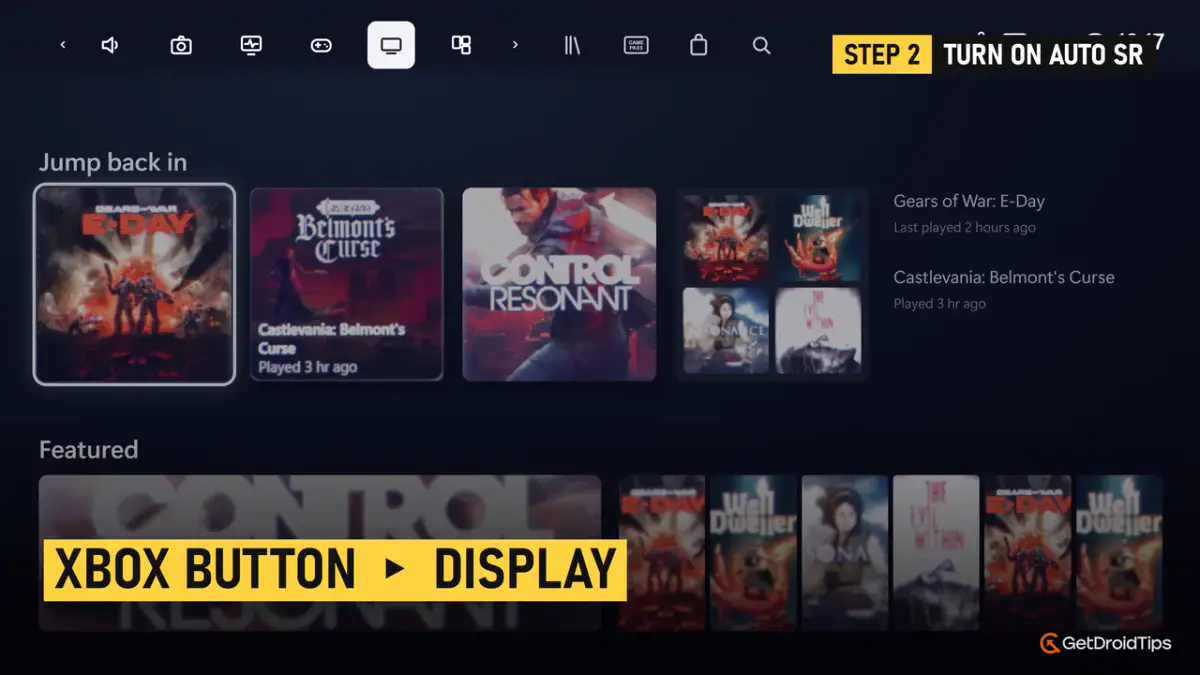
Press the Xbox button to open Game Bar, then select the Display widget in the top bar.
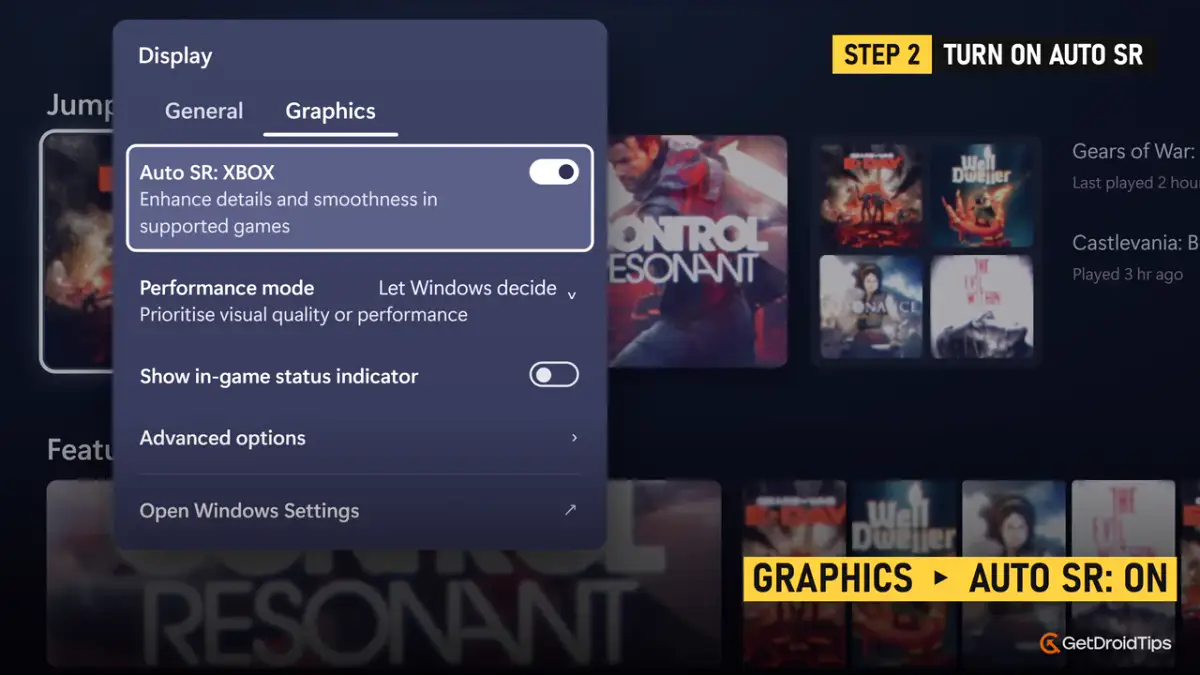
Switch to the Graphics tab and turn on Auto SR: Xbox. Its description reads that it enhances details and smoothness in supported games.
Step 3: Pick a Performance mode
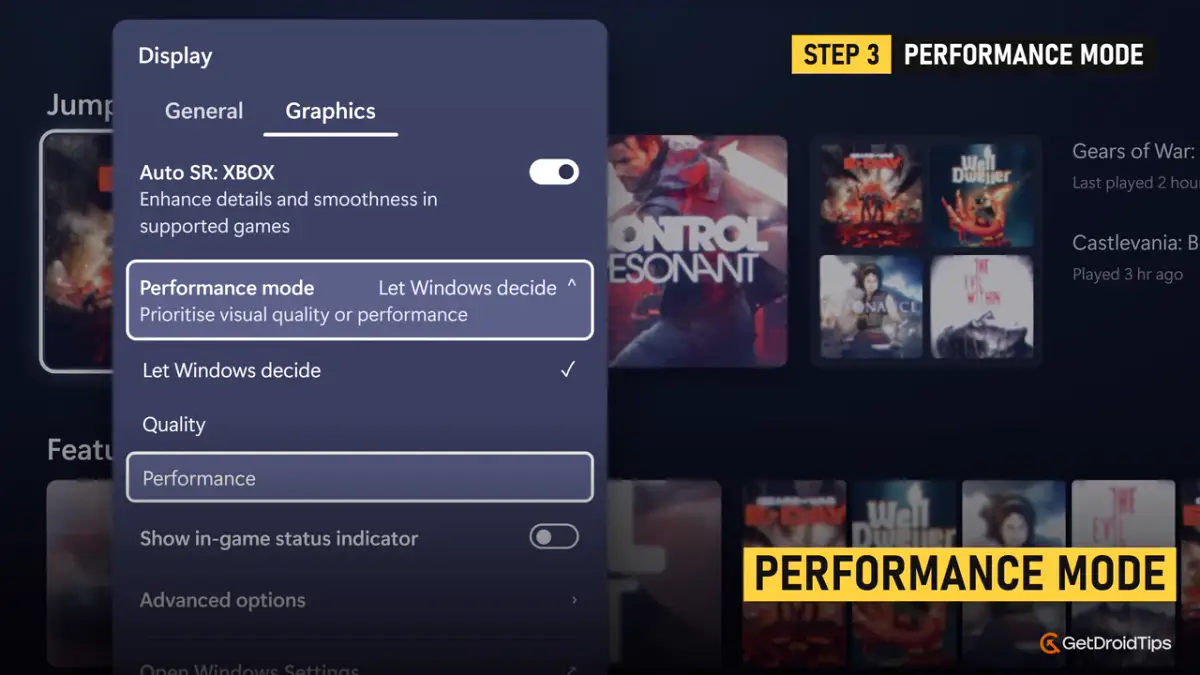
Open Performance mode on the same tab. You get three options:
Let Windows decide: the default, and a sensible place to start.
Quality: the sharpest image.
Performance: a lighter model that allows up to 120 FPS.
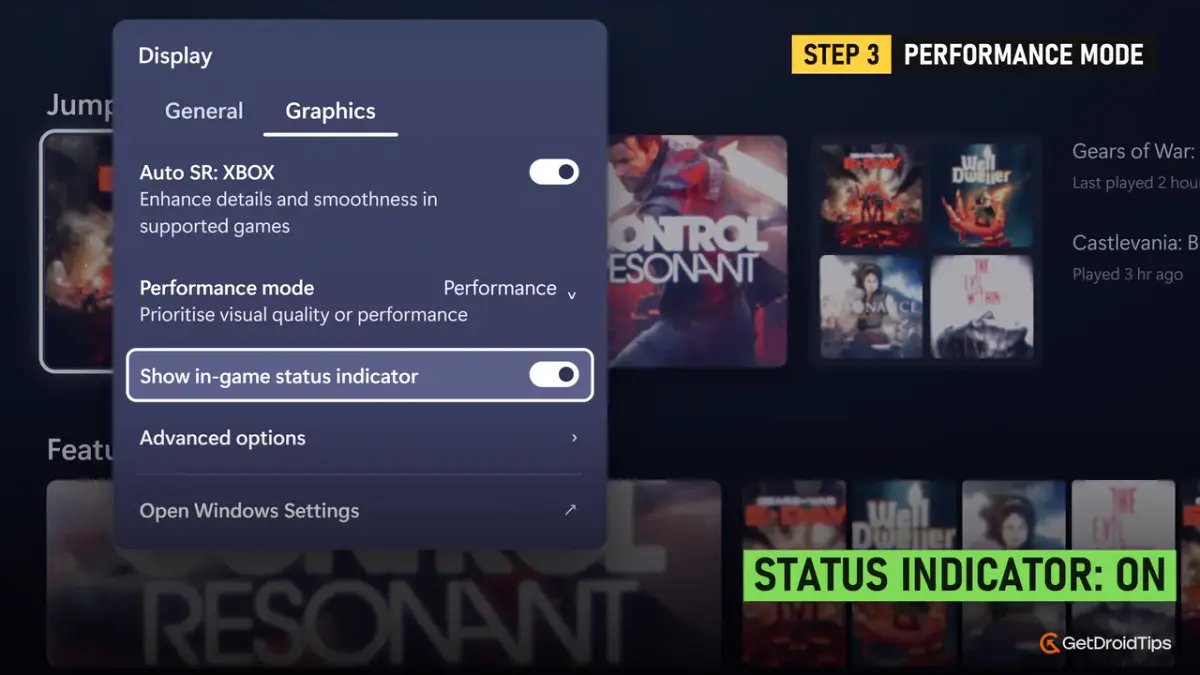
Next, turn on Show in-game status indicator. It puts a small marker on screen so you can tell when Auto SR is actually working.
Under Advanced options you can also switch Auto SR notifications on or off and set a Maximum display resolution. Leave that last one off to begin with.
Step 4: Lower the resolution
This is the step people skip. Auto SR needs a lower resolution to upscale from, otherwise there is little for it to do.
Go back to the General tab, open Resolution, and pick 1600 x 900 or 1280 x 720.
Auto SR now works at 1080p as well, but the difference is much bigger when it starts from 900p or 720p. Microsoft also cautions that 1080p on the internal screen may not perform as well as the lower settings.
Step 5: Launch your game
Start your game. A prompt asks whether you want to use Auto SR. Accept it, and the status indicator confirms that it is active.
No prompt or no toggle?
If the Auto SR option is missing, install pending updates for Windows, Game Bar and the Automatic Super Resolution package, then restart. If the toggle is there but the game does not use it, check the game’s graphics API in the section below.
Which games work with Auto SR?
Support is decided by the graphics API, not by a fixed list of titles. Microsoft says Auto SR works with DirectX 10 or later games. Titles that run on DirectX 9, Vulkan or OpenGL, and 32-bit games, are not supported.
Microsoft’s own suggestions to try include Control, Far Cry 6, Assassin’s Creed: Mirage, DOOM: The Dark Ages, Rise of the Tomb Raider and Tom Clancy’s The Division 2.
Tips for the best results
Do not stack upscalers. Use Auto SR, FSR or RSR, not several at once.
Prefer the game’s own upscaler when it has a good one. Microsoft says game-integrated super resolution remains the preferred choice. Auto SR is for games without one, or where the built-in option cannot hold both quality and frame rate.
Use it for older games. Titles with no upscaling setting at all gain the most.
Still under 60 FPS? Microsoft’s guidance, written with AMD, is to combine Auto SR with AFMF and switch off other upscaling and frame generation.
Expect a small cost. The NPU shares the chip’s power budget, so frame rates can sit slightly below a plain low-resolution run under heavy load.
Frequently Asked Questions
Does Auto SR work on the base ROG Xbox Ally?
No. The base model has no NPU, and Auto SR runs on the NPU.
Do I still need a dock or an external display?
No. That was a limit of the preview. Auto SR now works on the built-in screen and on battery.
Is Auto SR better than FSR?
It depends on the game. If a game has a well-implemented upscaler, use that. Auto SR is most useful when a game has no upscaler, or when you want sharper detail from a low render resolution.
Does Auto SR add input lag?
Microsoft says the approach trades one frame of latency for running a larger model on the NPU. Most players will not notice it in slower games, but it is worth knowing for competitive shooters.
Can I use Auto SR at 1080p?
Yes, since the latest update. The gain is smaller than starting from 900p or 720p.
Why is Performance mode missing on my handheld?
It is being rolled out gradually through Windows updates. Keep Windows and Game Bar updated and it should appear.
Final thoughts
Auto SR finally does what handheld owners wanted from the start: it works on the built-in screen. Turn it on in the Game Bar Display widget, drop the resolution to 900p or 720p, and let the NPU bring the detail back. Try it first on an older game with no upscaling option, since that is where the difference is easiest to see.
I'm a Tech Content Writer and Full-Time blogger. Since I love Android and Google's device, I started my career in writing for Android OS and their features. This led me to start "GetDroidTips". I have completed Master of Business Administration at Mangalore University, Karnataka.
Share
Leave a Comment
Share your thoughts, questions, or extra tips with other readers.