Nintendo made The Legend of Zelda: Ocarina of Time Remake a Switch 2 exclusive. Within days of its November 5 release, it was booting on PC through an experimental emulator called Lichii, and newer builds already reach 60 FPS in some areas, with DLSS and FSR options on top.
This guide shows how to install Lichii on Windows, add your own copy of the game, and pick the settings that make the biggest difference.
Before you start
Lichii is a free, open-source emulator. It does not include games, keys or firmware. You need to dump your own copy of Ocarina of Time Remake from your own Switch 2. This guide does not cover where to download the game, and we do not link to game files.

What is Lichii?
Lichii describes itself as an experimental, open-source Nintendo Switch and Switch 2 emulator written in C++. It builds on earlier projects including Eglantine, Eden, yuzu and Sudachi, and it is not affiliated with Nintendo.
The word that matters is experimental. The project says rendering errors, stutters and crashes are still possible, and it makes no frame-rate guarantee. For Ocarina of Time, only the early parts of the game have been tested widely so far.
What you need
- A Windows PC with a reasonably modern graphics card that supports Vulkan.
- 16 GB of RAM as a realistic minimum. 32 GB is more comfortable.
- Your own dumped copy of Ocarina of Time Remake.
- An up-to-date GPU driver. Update it first, because many emulator problems are simply old drivers.
Step 1: Download Lichii from GitHub only
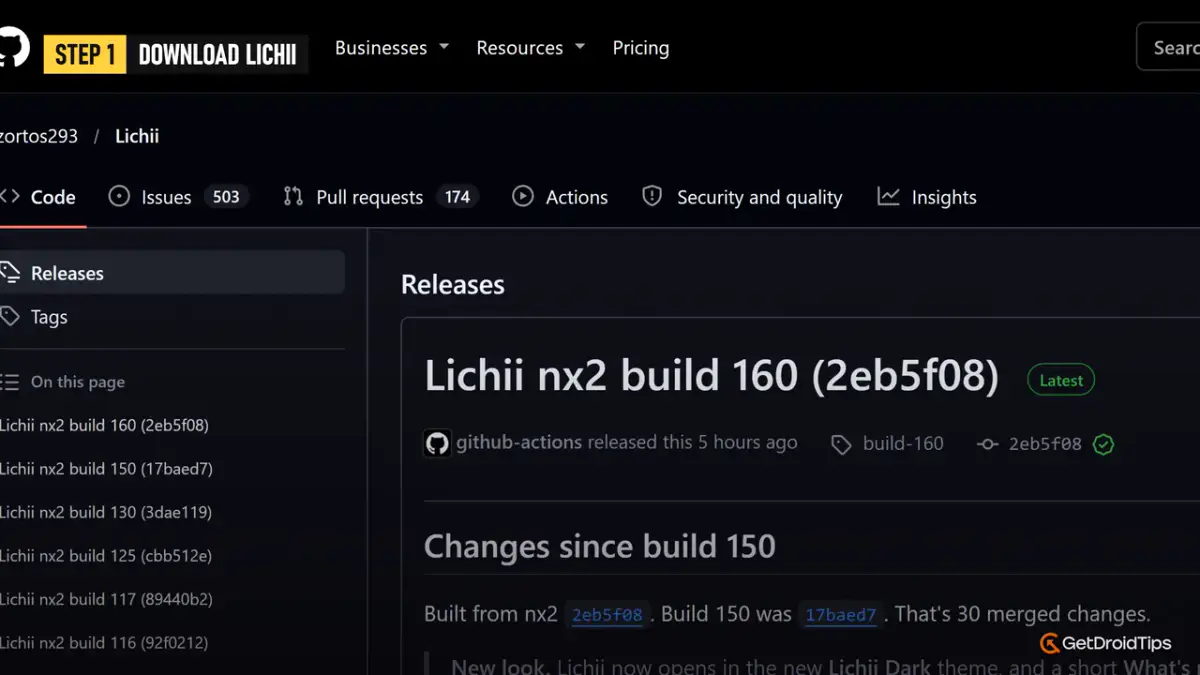
Open the Lichii Releases page on GitHub. The newest build is at the top and marked Latest. At the time of writing that is build 177, released on November 13, 2026, and new builds arrive every few days.
Avoid fake Lichii websites
The developers state that Lichii has no official website and that the GitHub Releases page is the only place to download it. They warn that other “Lichii” sites are not theirs and that one has been reported to install malware.
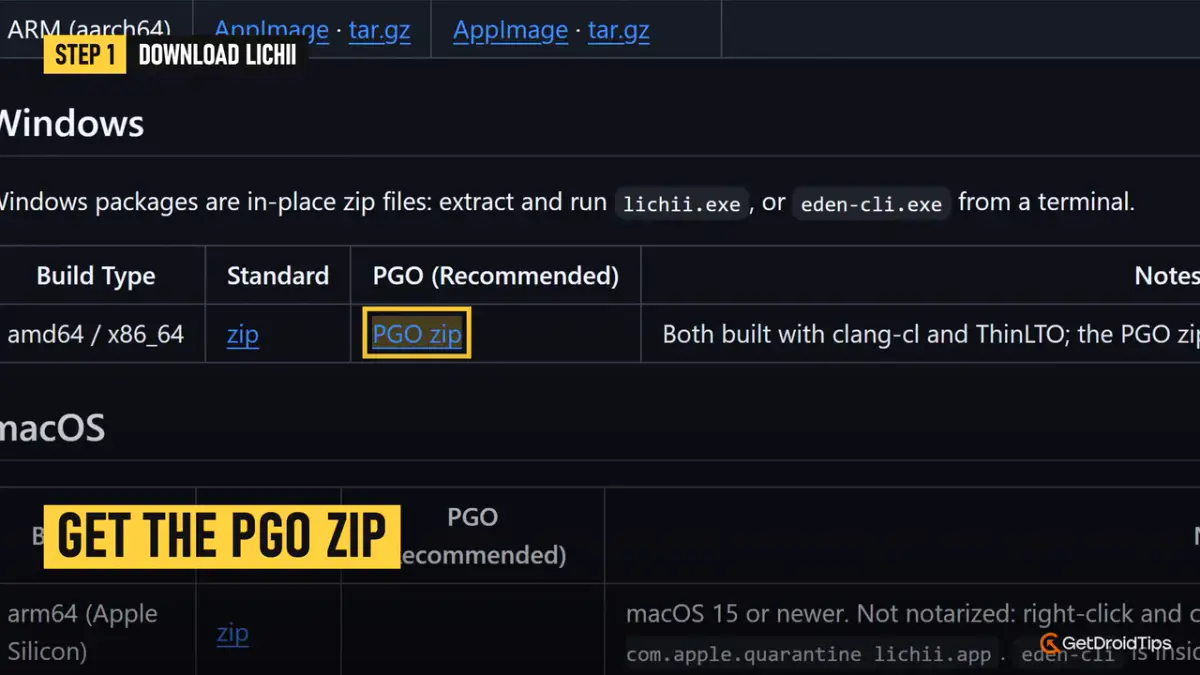
Scroll to the Windows section of the release. There are two zip files. Download the one labelled PGO, which the project marks as recommended because it is optimised for better performance.
Step 2: Extract and run it
Lichii has no installer.
- Right-click the zip and extract the entire archive to its own folder, for example a “Lichii” folder on your D drive.
- Open that folder and run lichii.exe.
On first launch you get a short “What’s new” window. Close it. If a notice about missing keys appears, it relates to encrypted Switch 1 game formats, so you can close that too and carry on.
Step 3: Add your game
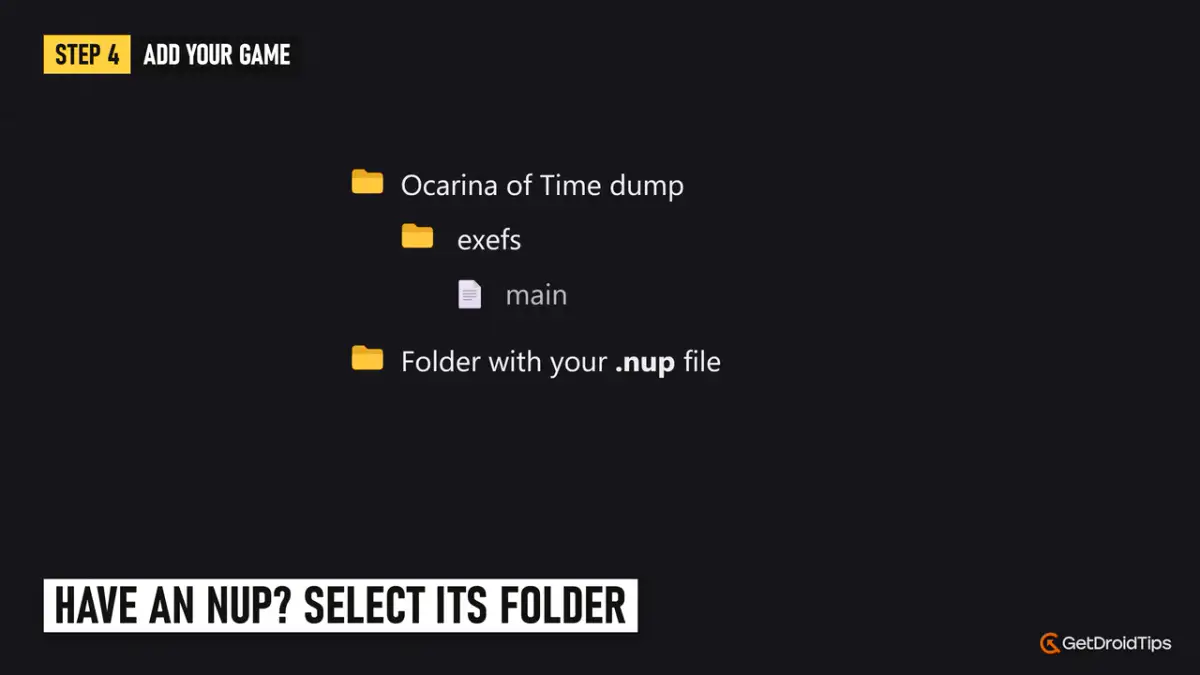
Click Add New Game Directory and point Lichii at your Ocarina of Time dump. Which folder you pick depends on the form of your dump:
- Folder dump: open it and select the exefs folder, the one that contains a file called main.
- NUP file: select the folder that contains the .nup file.
The Legend of Zelda: Ocarina of Time then appears in your game list.
Step 4: Try the one-click settings first
Newer builds include a shortcut. Go to Help > Apply Recommended Settings. It sets most options for you. If something breaks, Help > Restore My Previous Settings undoes it.
If the game still runs badly, or you want full control, set the options below by hand.
Step 5: The settings that matter
Open Emulation > Configure.
System
- GPU Clocks: Boost
- Multicore CPU Emulation: On
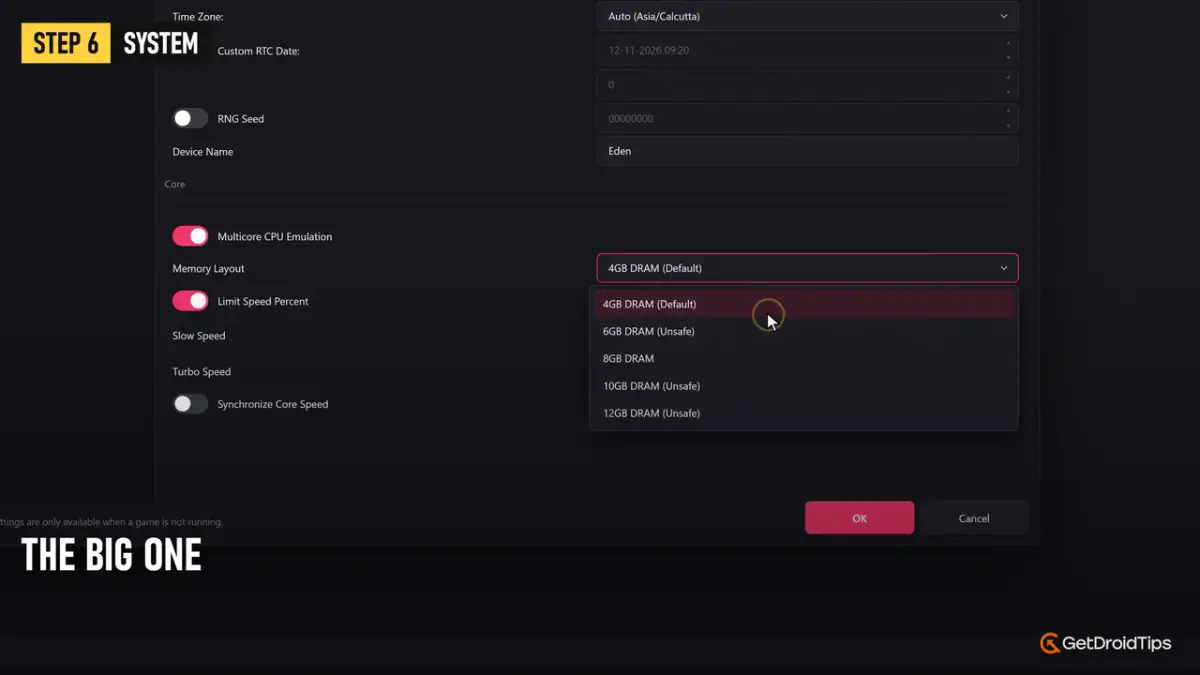
- Memory Layout: 12GB DRAM
Memory Layout is the big one. Switch 2 games need more memory than original Switch games, and with the default 4GB layout the game can crash or refuse to boot.
CPU
Set Accuracy to Auto. Unsafe can add a little speed, at the cost of stability.
Graphics
| Setting |
Value |
| API |
Vulkan |
| Device |
Your dedicated graphics card |
| Resolution |
1x or 2x on a mid-range card, higher only with plenty of VRAM |
| VSync Mode |
FIFO (VSync On) |
| Window Adapting Filter |
FSR 1 |
| Anti-Aliasing |
SMAA |
| Use asynchronous GPU emulation |
On |
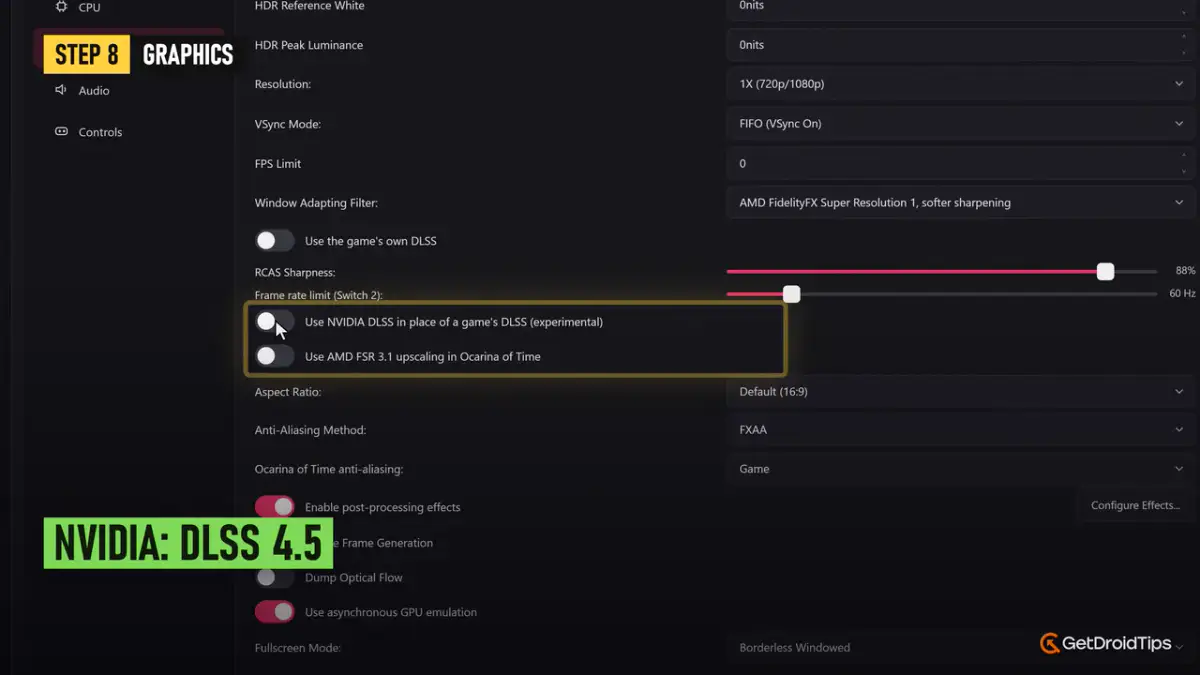
The same tab has game-specific upscaling switches. On NVIDIA cards you can use DLSS in place of the game’s own upscaler, and on AMD cards you can use FSR. If you see white streaks at night around Navi or fireflies, turn the NVIDIA DLSS option back off.
Advanced
- GPU Mode: Fast
- VRAM Usage Mode: Conservative
- ASTC Decoding Method: GPU
- Persistent pipeline cache and Vulkan pipeline cache: On. They cut stutter the next time you play.
If your card has limited video memory, ASTC Recompression Method is the setting to change:
| Your VRAM |
ASTC Recompression Method |
| More than 8 GB |
Leave uncompressed |
| 8 GB or less |
BC3 (medium quality) |
| 4 to 6 GB |
BC1 (lower quality, lowest memory use) |
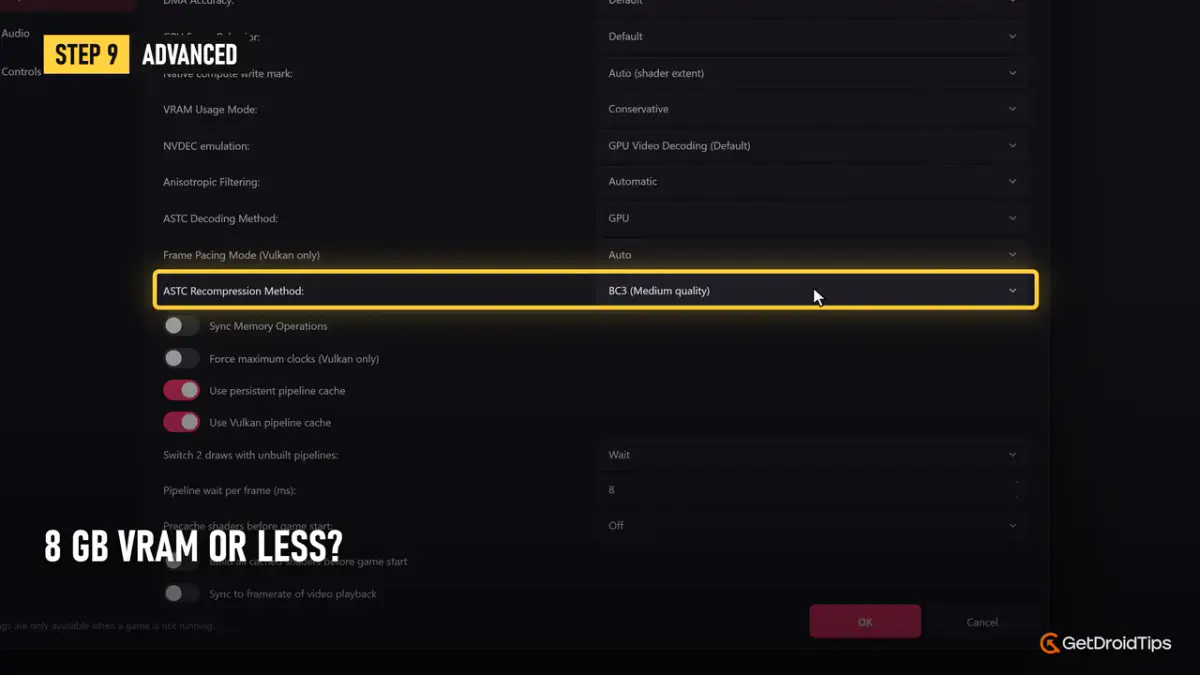
Keep asynchronous presentation and asynchronous shader compilation on. If you get graphical glitches, set Extended Dynamic State to Disabled. Click OK to save.
Step 6: Set up your controller
Go to Controls. Select your controller under Input Device and the buttons map automatically. You can remap anything you do not like, or choose Keyboard if you have no controller. Click OK.
Step 7: Launch the game
Double-click the game in your list.
Expect stutter the first time, while shaders are compiled. That is normal, and it smooths out as the cache fills. FPS unlock is built into recent builds, so you can go past 30 FPS without extra mods.
Fixes for common problems
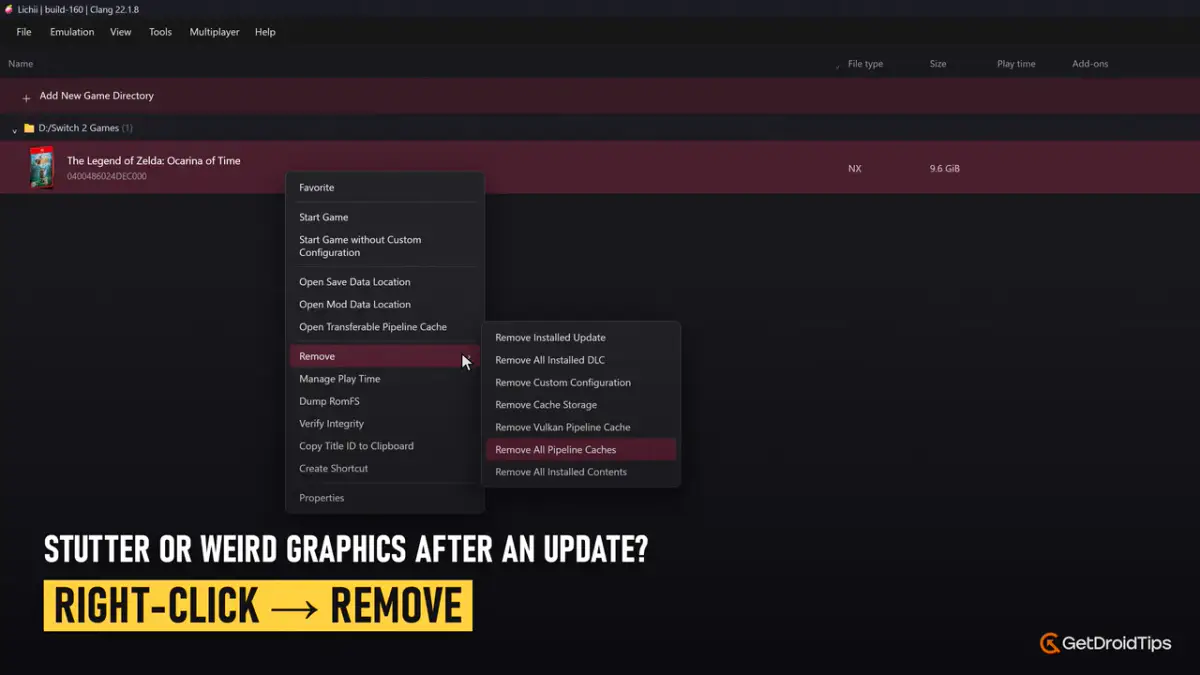
Stutter or strange graphics after updating Lichii
Right-click the game, choose Remove, then Remove All Pipeline Caches, and launch the game again.
The game crashes or will not boot
Check that Memory Layout is set to 12GB DRAM and that your GPU driver is current.
Black screens or broken lighting on AMD cards
Update your driver and download the newest Lichii build. Fixes land almost daily. Build 177 alone fixed floating distant forests in Hyrule Field, dark squares over water, and a likely cause of GPU hangs after long sessions.
Running out of video memory
Lower the resolution to 1x and switch ASTC Recompression to BC3 or BC1.
Backing up your save
Right-click the game and choose Open Save Data Location, then copy that folder somewhere safe.
Frequently Asked Questions
Is Lichii safe to download?
Yes, if you get it from the project’s own GitHub Releases page. The developers warn that other sites using the Lichii name are not theirs.
Is it legal to play Ocarina of Time Remake on PC?
Emulators themselves are legal software. Downloading a game you do not own is piracy. Lichii’s own guidance is to use only games and system files you have legally obtained, which means dumping your own copy from your own console.
What PC do I need?
There are no official minimum specs. Plan for 16 GB of RAM or more and a Vulkan-capable graphics card, and lower the resolution and texture settings on cards with 8 GB of VRAM or less.
Can I play at 60 FPS?
In some areas, on recent builds and capable hardware. Performance varies by area, GPU and driver, and the project makes no frame-rate promise.
Does Lichii need Switch keys or firmware?
They are not included. Lichii lists encrypted Switch 1 game files that it cannot open and tells you keys are missing.
Will my progress carry over between builds?
The release notes say settings, saves and shader caches are kept between builds. It is still sensible to back up your save folder before updating.
Final thoughts
Lichii makes it possible to play your own copy of Ocarina of Time Remake on PC only days after launch, but treat it as an early experiment. Use the PGO build from GitHub, set Memory Layout to 12GB, match the texture settings to your VRAM, and update often. Later parts of the game are still largely untested, so expect some bugs along the way.