Redmi 14C / Redmi A3 Pro / Poco C75 Firmware Flash File | Stock ROM (Android 16)

On this page, we will share all the latest Xiaomi Redmi 14C / Redmi A3 Pro / Poco C75 (codenamed: lake) firmware flash files. To flash the firmware file, you need the Xiaomi Mi Flash Tool, which works on Windows, Mac, and Linux. Follow this guide to flash the firmware stock ROM file on Redmi 14C / Redmi A3 Pro / Poco C75.

Redmi 14C / Redmi A3 Pro / Poco C75 Firmware Flash File

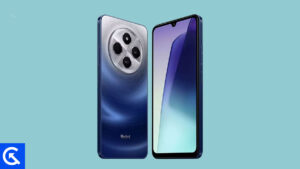
Xiaomi Redmi 14C Device Overview:

The Xiaomi Redmi 14C, released in August 2024, is a mid-range smartphone that boasts a large 6.88-inch IPS LCD display with a smooth 120Hz refresh rate and brightness up to 600 nits in High Brightness Mode (HBM). It has a resolution of 720 x 1640 pixels (~260 ppi), which provides clear and vivid visuals. The phone’s build consists of a glass front, a plastic frame, and a back made from either glass or eco-friendly silicone polymer (eco-leather). Weighing between 204 to 211g, depending on the model, the device supports dual SIM cards and is powered by the Mediatek Helio G81 Ultra chipset. The octa-core CPU (2×2.0 GHz Cortex-A75 & 6×1.8 GHz Cortex-A55) paired with the Mali-G52 MC2 GPU delivers reliable performance for multitasking and gaming.

On the camera front, the Redmi 14C features a dual rear camera setup with a 50 MP wide lens, a 2 MP depth sensor, and an auxiliary lens. For selfies, it includes a 13 MP front camera, both capable of 1080p video recording at 30fps. The device offers multiple memory configurations, ranging from 128GB with 4GB RAM to 256GB with 8GB RAM, with the option for expandable storage via a dedicated microSDXC card slot.

Other features include a side-mounted fingerprint sensor, a 5160 mAh battery supporting 18W fast charging, and connectivity options such as Bluetooth 5.4, NFC (depending on the region), FM radio, and USB Type-C. The phone runs on Android 14 with Xiaomi’s HyperOS, ensuring an updated and smooth user experience.

Advantages of Stock ROM:

Here are the answers to why you need to download and save the Redmi 14C / Redmi A3 Pro / Poco C75 Stock ROM flash file on your computer.

  • If your device is dead, you can unbrick using the Stock ROM file
  • You can fix or repair the IMEI on your device using DB files from Stock ROM
  • Remove any malware or Adware from Redmi 14C / Redmi A3 Pro / Poco C75
  • You can fix the boot loop issue on Redmi 14C / Redmi A3 Pro / Poco C75
  • Fix Unfortunately; the app has stopped errors on Redmi 14C / Redmi A3 Pro / Poco C75
  • Fix Network related issue
  • Patch Boot image to Root using Magisk
  • You can unroot Redmi 14C / Redmi A3 Pro / Poco C75
  • To Reset or Remove FRP on your device:
  • Restore Redmi 14C / Redmi A3 Pro / Poco C75 to Factory State

How to install Stock Firmware on Redmi 14C / Redmi A3 Pro / Poco C75

Before installing, follow the prerequisites and install the necessary drivers and tools on your PC.

Pre-Requisites:

Download Flash Files

Global Stable ROM:

Version and Download Link Changelog
OS3.0.6.0.WGTMIXM

Recovery ROM

  • Basic experience
    • Smoother and more stable
    • Performance enhancements:
    • Optimization: Refined compiler instructions enhance performance and responsiveness while lowering power use.
    • Optimization: Improved memory allocation and recovery increases available system memory.
    • Optimization: Improved integrated frequency scheduling boosts system efficiency and reduces power consumption.
    • Optimization: Improved short-video playback efficiency for better battery life.
    • Optimized graphics:
    • A new window-rendering mechanism reduces graphics-rendering load.
    • Smoother system animations:
    • Optimization: Fine-tuned animations across 100+ system scenes for smoother, more natural motion.
  • Xiaomi HyperIsland
    • Everything you need to keep an eye on. In one place.
    • A new format that combines Notification spotlight and device notifications makes any important updates reach you faster.
    • New UI design lets you see all the details at a glance, with smoother switching between islands.
    • Now you can pull down to expand small windows and handle multiple tasks more efficiently.
  • Revamped visuals
    • Cleaner, more refined visuals throughout.
    • Redesigned Home screen icons now look sharper and more detailed.
    • The Home screen grid has been redesigned with more balanced margins and more comfortable spacing.
    • The status bar has a new, cleaner design that’s more refined and easier to read.
    • A new design system improves color comfort, unifies rounded corners across the entire system, and makes controls easier to use for a more consistent look and feel.
    • A new large-clock Lock screen adds more depth and layers to the layout.
    • A new all-in-one editor allows you to adjust both the Home screen and Lock screen wallpapers at the same time.
  • Comprehensive system app optimization
    • Interaction with apps has become more intuitive and direct.
    • Gallery:
    • New: New Gallery widgets allow you to select your preferred collections for display.
    • New: You can pin albums now to have quick access to your favorite photos anytime.
    • Weather:
    • Optimization: Improved content card blur effects for a smoother, more immersive scrolling experience.
    • Calendar:
    • New: Week view gives you a clear look at your weekly schedule.
    • Optimization: Improved month-view visuals give you clearer highlights for holidays and important events.
    • Recorder:
    • Optimization: Accurate start page categories let you locate recordings faster with icons.
    • Optimization: Improved playback brings you smart noise reduction for clearer voices.
  • Privacy and security
    • Enhanced protection keeps your data private and safe.
    • The system’s privacy and password features have been redesigned with a cleaner, fresher interface.
    • Advanced data protection now uses post-quantum encryption to keep personal data even more secure.
  • System
    • Updated the security patch to November 2025. Increased system security.
OS2.0.203.0.VGTMIXM

Recovery ROM

  • System
    • Updated the security patch to October 2025. Increased system security.
OS2.0.202.0.VGTMIXM

Recovery ROM

  • System animations
    • Optimization: Interrupt animation during app transitions
    • Optimization: Interrupt animation when entering subpages within apps
  • System
    • New: Home screen wallpaper now supports a blur effect
    • Optimization: Updated styles for some classic pages
    • Updated the security patch to August 2025. Increased system security.
  • Lock screen
    • New: Eastern aesthetics lock screen templates
    • New: Customizable Lock screen shortcuts
  • Settings
    • Optimization: Added a shortcut to system navigation settings in Home screen settings
  • Status bar, Notification shade
    • New: Some status bar icons now support custom display
OS2.0.3.0.VGTMIXM

Recovery ROM

  • System
    • Optimization: System stability
    • Fix: Errors occurred in some cases
OS2.0.1.0.VGTMIXM

Recovery ROM

  • System
    • Updated the security patch to April 2025. Increased system security.
  • Alive Design Philosophy
    • Alive Design Philosophy unveils fresh, vibrant design across the whole system, making every interaction feel smooth and alive.
    • All-new Artistic Lock screen:
    • Artistic Lock screen brings new templates and effects inspired by classic designs, giving your device a cinematic look every time you unlock it.
    • All-new Gallery:
    • With AI and reorganized collections, Gallery makes your memories even more vivid.
    • All-new Weather
    • Real-time Weather Engine 2.0 shows you the sky and clouds just like in real life – even lets you see rainbows and the Milky Way.
    • All-new Calendar:
    • The new Desktop calendar adds a touch of ritual to your day.
    • All-new Clock:
    • Updated Clock uses a more refined display structure for a more elegant, easy-to-read look.
    • Updated animations:
    • A full-scale animation upgrade makes every interaction flow smoothly and feel stable, responsive, and comfortable.
OS1.0.13.0.UGTMIXM

Recovery ROM

  • System
    • Updated the security patch to March 2025. Increased system security.
OS1.0.10.0.UGTMIXM

Recovery ROM

  • System
    • Updated the security patch to November 2024. Increased system security.
OS1.0.9.0.UGTMIXM

Recovery ROM

  • System
    • Updated the security patch to October 2024. Increased system security.
OS1.0.6.0.UGTMIXM

Recovery ROM

  • Control center
    • Fix: “Edit” option disappeared after using the cloud sync switch
OS1.0.5.0.UGTMIXM

Recovery ROM

  • System
    • Updated the security patch to September 2024. Increased system security.
OS1.0.4.0.UGTMIXM

Recovery ROM

  • System
    • Updated the security patch to August 2024. Increased system security.

Europe Stable ROM:

Version and Download Link Changelog
OS2.0.208.0.VGTEUXM

Recovery ROM

  • System
    • Updated the security patch to December 2025. Increased system security.
OS2.0.207.0.VGTEUXM

Recovery ROM

  • System
    • Optimization: System stability
    • Fix: Errors occurred in some cases
OS2.0.204.0.VGTEUXM

Recovery ROM

  • System
    • Updated the security patch to October 2025. Increased system security.
OS2.0.203.0.VGTEUXM

Recovery ROM

  • System
    • Updated the security patch to August 2025. Increased system security.
OS2.0.202.0.VGTEUXM

Recovery ROM

  • System animations
    • Optimization: Interrupt animation during app transitions
    • Optimization: Interrupt animation when entering subpages within apps
  • System
    • New: Home screen wallpaper now supports a blur effect
    • Optimization: Updated styles for some classic pages
    • Updated the security patch to June 2025. Increased system security.
  • Lock screen
    • New: Eastern aesthetics lock screen templates
    • New: Customizable Lock screen shortcuts
  • Settings
    • Optimization: Added a shortcut to system navigation settings in Home screen settings
  • Status bar, Notification shade
    • New: Some status bar icons now support custom display
OS2.0.1.0.VGTEUXM

Recovery ROM

  • System
    • Updated the security patch to April 2025. Increased system security.
  • Alive Design Philosophy
    • Alive Design Philosophy unveils fresh, vibrant design across the whole system, making every interaction feel smooth and alive.
    • All-new Artistic Lock screen:
    • Artistic Lock screen brings new templates and effects inspired by classic designs, giving your device a cinematic look every time you unlock it.
    • All-new Gallery:
    • With AI and reorganized collections, Gallery makes your memories even more vivid.
    • All-new Weather
    • Real-time Weather Engine 2.0 shows you the sky and clouds just like in real life – even lets you see rainbows and the Milky Way.
    • All-new Calendar:
    • The new Desktop calendar adds a touch of ritual to your day.
    • All-new Clock:
    • Updated Clock uses a more refined display structure for a more elegant, easy-to-read look.
    • Updated animations:
    • A full-scale animation upgrade makes every interaction flow smoothly and feel stable, responsive, and comfortable.
OS1.0.9.0.UGTEUXM

Recovery ROM

  • System
    • Updated the security patch to May 2025. Increased system security.
OS1.0.8.0.UGTEUXM

Recovery ROM

  • System
    • Updated the security patch to March 2025. Increased system security.
OS1.0.6.0.UGTEUXM

Recovery ROM

  • System
    • Updated the security patch to November 2024. Increased system security.
OS1.0.5.0.UGTEUXM

Recovery ROM

  • System
    • Updated the security patch to October 2024. Increased system security.
OS1.0.4.0.UGTEUXM

Recovery ROM

  • System
    • Updated the security patch to September 2024. Increased system security.
OS1.0.3.0.UGTEUXM

Recovery ROM

  • System
    • Updated the security patch to August 2024. Increased system security.

Please note that GetDroidTips cannot be held responsible for any damages, either internal or external, that may occur to your device as a result of following this guide. We advise you to proceed only if you have a good understanding of what you are doing and are confident in your ability to follow the instructions correctly. Your caution and care are appreciated.

Instructions to Flash The ROM:

To install MIUI Flash files on your Redmi 14C / Redmi A3 Pro / Poco C75, we have given two methods, either you can follow the recovery method, or you can follow the Fastboot method. A detailed guide on both methods is given below:

Guide to Install Stock ROM On Xiaomi Devices

I hope you installed the firmware file on Redmi 14C / Redmi A3 Pro / Poco C75 (lake) successfully; now, please rate this website with your comments. We always welcome feedback and improvements.

Leave a Reply

Comments are moderated manually, and are only approved and published if they are relevant and add value to the discussion. Please be polite and respectful to the staff as well as other commentors.