Xiaomi Mi 11 Stock Firmware Collections (Android 12, 13 & 14)

On this page, we will share all the latest Xiaomi Mi 11 (codenamed venus) firmware flash files. To flash the firmware file, you need Xiaomi Mi Flash Tool which works on both Windows, Mac, and Linux. You can follow this guide to flash the firmware stock ROM file on Xiaomi Mi 11.

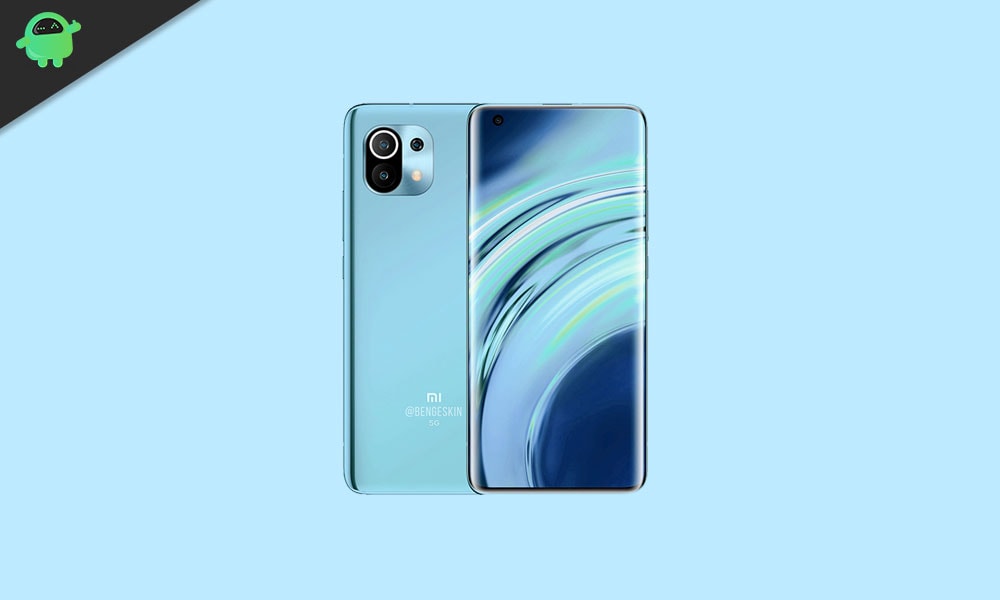
Every year Xiaomi launches its premium smartphone under the Mi lineup, and this year in 2021 we will have the Xiaomi Mi 11. This is the best that Xiaomi has to offer, and it comes with all the latest bells and whistles. It has already been announced on the 28th of December, and it is expected to launch someday in January officially. So what do we get with this 2021 flagship phone from Xiaomi? Let’s take a look at it.

Xiaomi Mi 11 Device Overview:

Xiaomi Mi 11 Stock Firmware Collections

The Xiaomi Mi 11 features a 6.81-inches AMOLED Panel with support for 1B colors. It has a resolution of 1440 x 3200 pixels and an aspect ratio of 20:9. This is a 120 Hz high refresh rate panel that can go as high as 1500 nit in brightness. And as for protection, we have the latest Corning Gorilla Glass Victus on the Mi 11. For the processor, we get the latest and top-of Qualcomm Snapdragon 888, an octa-core processor built on a 5nm manufacturing process. It has one Kryo 680 core clocked at 2.84 GHz Kryo 680, 3 Kryo 680 cores clocked at 2.42 GHz, and four Kryo 680 cores clocked at 1.8 GHz.

Coming to optics, we get a triple camera setup with a 108 MP primary sensor with an f/1.9 lens, a 13MP ultrawide sensor with an f/2.4 lens, and a 5MP macro sensor paired with an f/2.4 lens. We get PDAF, OIS, Dual-LED dual-tone flash along with 8K video support at 24/30 fps. For selfies, we get a single 20MP wide sensor paired with an f/2.4 lens. The front is only limited to 1080p videos. We have a number of options  for this device when it comes to RAM and storage variants: 8GB + 128GB, 8GB + 256GB and 12GB + 256GB. It runs on MIUI 12.5 skinned on top of Android 11.

For connectivity, we get Wi-Fi 802.11 a/b/g/n/ac/6, Bluetooth 5.2, GPS, NFC, and USB Type-C 2.0. And for sensors, we have the under-display fingerprint sensor(optical), accelerometer, gyro, proximity, infrared, and compass. We get a moderate battery size of 4,600mAh with support for 55W fast charging. The company claims a charging speed of 100% in 45 minutes. The smartphone also supports 50W fast wireless charging. This smartphone is available in five colour options: Black, White, Blue, Purple, and Khaki.

Advantages of Stock ROM:

Here are the answers to why you need to download and save the Mi 11 Stock ROM flash file on your computer.

  • If your device is dead, you can unbrick using the Stock ROM file
  • You can fix or repair the IMEI on your device using DB files from Stock ROM
  • Remove any malware or Adwares from Mi 11
  • You can fix the boot loop issue on Mi 11
  • Fix Unfortunately, the app has stopped error on Mi 11
  • Fix Network related issue
  • Patch Boot image to Root using Magisk
  • You can unroot Mi 11
  • To Reset or Remove FRP on your device:
  • Restore Mi 11 back to Factory State

How to install Stock Firmware on Xiaomi Mi 11

Before installing, make sure to follow the pre-requisite and install the necessary drivers and tools on your PC.

Pre-Requisites:

Global Firmware Flash File:

OS2.0.3.0.UKBMIXM

  • System
    • Fix: Errors occurred in some cases
OS2.0.1.0.UKBMIXM

  • Alive Design Philosophy
    • Alive Design Philosophy unveils fresh, vibrant design across the whole system, making every interaction feel smooth and alive.
  • Xiaomi HyperCore
    • Xiaomi HyperCore, Xiaomi’s proprietary core technology platform, enhances performance, graphics, network, and security.
    • New dynamic memory:
    • New technology allows precise resource allocation, so apps start up faster.
    • Heterogeneous computing:
    • Enhanced rendering pipeline boosts hardware performance for faster, more efficient visuals.
OS1.0.10.0.UKBMIXM

  • System
    • Updated the security patch to November 2024. Increased system security.
OS1.0.9.0.UKBMIXM

  • Other
    • Optimized system performance
    • Improved system security and stability
OS1.0.8.0.UKBMIXM

  • System
    • Updated the security patch to September 2024. Increased system security.
OS1.0.5.0.UKBMIXM

  • System
    • Optimization: New startup animation strategy reduces app launch delays
    • Updated the security patch to July 2024. Increased system security.
OS1.0.2.0.UKBMIXM

  • System
    • Updated Android Security Patch to March 2024. Increased system security.
  • Vibrant aesthetics
    • Global aesthetics draw inspiration from life itself and change the way your device looks and feels
    • New animation language makes interactions with your device wholesome and intuitive
    • Natural colors bring vibrancy and vitality to every corner of your device
    • Our all-new system font supports multiple writing systems
    • Redesigned Weather app not only gives you important information, but also shows you how it feels outside
    • Notifications are focused on important information, presenting it to you in the most efficient way
    • Every photo can look like an art poster on your Lock screen, enhanced by multiple effects and dynamic rendering
    • New Home screen icons refresh familiar items with new shapes and colors
    • Multitasking is now even more straightforward and convenient with an upgraded multi-window interface
V14.0.7.0.TKBMIXM

  • System
    • Updated Android Security Patch to November 2023. Increased system security.
V14.0.4.0.TKBMIXM

  • System
    • Updated Android Security Patch to May 2023. Increased system security.
V14.0.3.0.TKBMIXM

  • System
    • Updated Android Security Patch to May 2023. Increased system security.
V14.0.1.0.TKBMIXM

  • Highlights
    • MIUI uses less memory now and keeps being swift and responsive over much more extended periods.
    • Improved system architecture comprehensively boosts the performance of both pre-installed and third-party apps while saving power.
    • More than 30 scenes now support end-to-end privacy with no data stored in the cloud and all actions performed locally on the device.
    • Family services allow sharing all the essential things with the people you care about most.
  • System
    • Updated Android Security Patch to February 2023. Increased system security.
    • Stable MIUI based on Android 13
  • Mi AI voice assistant
    • Mi AI allows you to perform complicated daily tasks by using simple voice commands. Communicating with your device could never be easier.
    • With Mi AI, you can scan and recognize anything – be it an unfamiliar plant or an important document.
    • Mi AI is ready to help whenever you bump into a language barrier. Smart translation tools support multiple languages.
    • Dealing with calls is so convenient with Mi AI: it can filter spam calls or easily take care of the calls for you.
    • Mi AI is no longer just a voice assistant. You can use it as a scanner, translator, call assistant, and more.
  • More features and improvements
    • Search in Settings is now more advanced. With search history and categories in results, everything looks much crisper now.
V13.0.6.0.SKBMIXM

  • System
    • Updated Android Security Patch to December 2022. Increased system security.
V13.0.5.0.SKBMIXM

  • System
    • Updated Android Security Patch to October 2022. Increased system security.
V13.0.4.0.SKBMIXM

  • System
    • Updated Android Security Patch to July 2022. Increased system security.
V13.0.1.0.SKBMIXM

  • System
    • Stable MIUI based on Android 12
    • Updated Android Security Patch to January 2022. Increased system security.
  • Attention
    • This update is a limited release for Mi Pilot testers. Don’t forget to back up all important items before upgrading. The update process might take longer than usual. Expect overheating and other performance issues after you update – it might take some time for your device to adapt to the new version. Remember that some third-party apps aren’t yet compatible with Android 12 and you might not be able to use them normally.
  • Lock screen
    • Fix: Home screen froze when the screen turned on and off rapidly
    • Fix: UI items overlapped after switching resolution
    • Fix: Wallpaper Carousel buttons didn’t always work
    • Fix: UI elements overlapped in Control center and Notification shade
    • Fix: The back button went gray in some cases
    • Fix: Lock screen wallpaper was replaced with Home screen wallpaper in some cases
  • Status bar, Notification shade
    • Fix: Smart refresh rate
  • Settings
    • Fix: Crashes occurred when the default map was selected
  • More features and improvements
    • New: Apps can be opened as floating windows directly from the sidebar
    • Optimization: Enhanced accessibility support for Phone, Clock, and Weather
    • Optimization: Mind map nodes are more convenient and intuitive now
V12.5.11.0.RKBMIXM

  • System
    • Updated Android Security Patch to December 2021. Increased system security
V12.5.5.0.RKBMIXM

  • System
    • Updated Android Security Patch to June 2021. Increased system security.
  • Other
    • Fix: Knuckle double tap stopped working after Game Turbo had been turned off
V12.5.1.0.RKBMIXM

  • System
    • New: Response to gestures is now instant.
    • New: With 20 times more rendering power, there are now few limits to what you can see on your screen.
    • New: With custom device model adjustments, any phone becomes faster after the upgrade.
    • Optimization: MIUI became lighter, faster, and more durable.
  • Notes
    • New: Compose mind maps with complex structures.
    • New: New tools for doodling and sketching.
    • New: Press and hold a sketch to adjust the strokes automatically.
    • New: A gesture shortcut now allows you to create notes, tasks, and excerpts anywhere.
    • New: Excerpts save text, URLs, and images to Notes in a few simple taps.
    • New: Dynamic layouts bring the typography in Notes to a new level.
    • All-new Notes
V12.0.4.0.RKBMIXM

Other

  • Optimization: Increased system stability
  • Optimization: Reduced system lag

Europe Firmware Flash File:

MIUI Version Changelog
OS2.0.3.0.UKBEUXM

  • System
    • Fix: Errors occurred in some cases
OS2.0.2.0.UKBEUXM

  • System
    • Updated the security patch to April 2025. Increased system security.
OS2.0.1.0.UKBEUXM

  • Alive Design Philosophy
    • Alive Design Philosophy unveils fresh, vibrant design across the whole system, making every interaction feel smooth and alive.
  • Xiaomi HyperCore
    • Xiaomi HyperCore, Xiaomi’s proprietary core technology platform, enhances performance, graphics, network, and security.
    • New dynamic memory:
    • New technology allows precise resource allocation, so apps start up faster.
    • Heterogeneous computing:
    • Enhanced rendering pipeline boosts hardware performance for faster, more efficient visuals.
OS1.0.12.0.UKBEUXM

  • System
    • Optimization: System stability
OS1.0.8.0.UKBEUXM

  • System
    • Updated the security patch to September 2024. Increased system security.
OS1.0.6.0.UKBEUXM

  • System
    • Optimization: New startup animation strategy reduces app launch delays
    • Updated the security patch to August 2024. Increased system security.
  • Lock screen
    • Optimization: New “press and hold to edit” logic for Lock screen reduces accidental triggers
OS1.0.5.0.UKBEUXM

  • System
    • Optimization: New startup animation strategy reduces app launch delays
    • Updated the security patch to July 2024. Increased system security.
OS1.0.3.0.UKBEUXM

  • System
    • Updated the security patch to June 2024. Increased system security.
OS1.0.2.0.UKBEUXM

  • System
    • Updated Android Security Patch to March 2024. Increased system security.
  • Vibrant aesthetics
    • Global aesthetics draw inspiration from life itself and change the way your device looks and feels
    • New animation language makes interactions with your device wholesome and intuitive
    • Natural colors bring vibrancy and vitality to every corner of your device
    • Our all-new system font supports multiple writing systems
    • Redesigned Weather app not only gives you important information, but also shows you how it feels outside
    • Notifications are focused on important information, presenting it to you in the most efficient way
    • Every photo can look like an art poster on your Lock screen, enhanced by multiple effects and dynamic rendering
    • New Home screen icons refresh familiar items with new shapes and colors
    • Multitasking is now even more straightforward and convenient with an upgraded multi-window interface
V14.0.6.0.TKBEUXM

  • System
    • Updated Android Security Patch to August 2023. Increased system security.
V14.0.4.0.TKBEUXM

  • System
    • Updated Android Security Patch to May 2023. Increased system security.
V14.0.3.0.TKBEUXM

  • Highlights
    • MIUI uses less memory now and keeps being swift and responsive over much more extended periods.
    • Improved system architecture comprehensively boosts the performance of both pre-installed and third-party apps while saving power.
    • More than 30 scenes now support end-to-end privacy with no data stored in the cloud and all actions performed locally on the device.
    • Family services allow sharing all the essential things with the people you care about most.
  • System
    • Stable MIUI based on Android 13
    • Updated Android Security Patch to January 2023. Increased system security.
    • Updated Android Security Patch to March 2023. Increased system security.
  • Mi AI voice assistant
    • Mi AI allows you to perform complicated daily tasks by using simple voice commands. Communicating with your device could never be easier.
    • With Mi AI, you can scan and recognize anything – be it an unfamiliar plant or an important document.
    • Mi AI is ready to help whenever you bump into a language barrier. Smart translation tools support multiple languages.
    • Dealing with calls is so convenient with Mi AI: it can filter spam calls or easily take care of the calls for you.
    • Mi AI is no longer just a voice assistant. You can use it as a scanner, translator, call assistant, and more.
  • More features and improvements
    • Search in Settings is now more advanced. With search history and categories in results, everything looks much crisper now.
V14.0.2.0.TKBEUXM

  • Highlights
    • MIUI uses less memory now and keeps being swift and responsive over much more extended periods.
    • Improved system architecture comprehensively boosts the performance of both pre-installed and third-party apps while saving power.
    • More than 30 scenes now support end-to-end privacy with no data stored in the cloud and all actions performed locally on the device.
    • Family services allow sharing all the essential things with the people you care about most.
  • System
    • Stable MIUI based on Android 13
    • Updated Android Security Patch to January 2023. Increased system security.
  • Mi AI voice assistant
    • Mi AI allows you to perform complicated daily tasks by using simple voice commands. Communicating with your device could never be easier.
    • With Mi AI, you can scan and recognize anything – be it an unfamiliar plant or an important document.
    • Mi AI is ready to help whenever you bump into a language barrier. Smart translation tools support multiple languages.
    • Dealing with calls is so convenient with Mi AI: it can filter spam calls or easily take care of the calls for you.
    • Mi AI is no longer just a voice assistant. You can use it as a scanner, translator, call assistant, and more.
  • More features and improvements
    • Search in Settings is now more advanced. With search history and categories in results, everything looks much crisper now.
V13.0.9.0.SKBEUXM

  • System
    • Updated Android Security Patch to December 2022. Increased system security.
V13.0.8.0.SKBEUXM

  • System
    • Updated Android Security Patch to October 2022. Increased system security.
V13.0.7.0.SKBEUXM

  • System
    • Updated Android Security Patch to July 2022. Increased system security.
V13.0.6.0.SKBEUXM

  • System
    • Updated Android Security Patch to June 2022. Increased system security.
V13.0.4.0.SKBEUXM

System

  • Android 12 Update
  • MIUI 13
  • Updated Android Security Patch to February 2022.
  • Increased system security
V13.0.1.0.SKBEUXM

System

  • Android 12 Update
  • MIUI 13
  • Updated Android Security Patch to February 2022.
  • Increased system security
V12.5.9.0.RKBEUXM

  • Other
    • Optimized system performance
    • Improved system security and stability
V12.5.4.0.RKBEUXM

Not Known
V12.5.2.0.RKBEUXM

System

  • Updated Android Security Patch to May 2021. Increased system security

Turkey Firmware Flash File:

MIUI Version Changelog
V14.0.1.0.TKBTRXM

  • System
    • Updated Android Security Patch to February 2023. Increased system security.
    • Stable MIUI based on Android 13
  • More features and improvements
    • Search in Settings is now more advanced. With search history and categories in results, everything looks much crisper now.
V13.0.2.0.SKBTRXM

  • System
    • Updated Android Security Patch to June 2022. Increased system security.
V13.0.1.0.SKBTRXM

  • System
    • Stable MIUI based on Android 12
    • Updated Android Security Patch to February 2022. Increased system security.
  • More features and improvements
    • New: Apps can be opened as floating windows directly from the sidebar
    • Optimization: Enhanced accessibility support for Phone, Clock, and Weather
    • Optimization: Mind map nodes are more convenient and intuitive now
V12.5.2.0.RKBTRXM

  • System
    • Updated Android Security Patch to June 2021. Increased system security.
  • Other
    • Fix: Knuckle double tap stopped working after Game Turbo had been turned

Disclaimer!

GetDroidTips will not be responsible for any internal/external damages to the device that may happen while/after following this guide. Please proceed if you know what you’re doing!

Instructions to Flash The ROM:

To install MIUI Flash files on your Xiaomi Mi 11, we have given two methods, either you can follow the recovery method or you can follow the Fastboot method. A detailed guide on both methods is given down below:

Guide to Install MIUI ROM on Xiaomi Device [Recovery/Fastboot]

Watch Video Tutorial

I hope you installed the Stock ROM on Xiaomi Mi 11 (venus) successfully, Now please rate this website with your comment. We always welcome feedback and improvements.

Discussion

1 Comment
  1. xiaomi mi 11 lite 5g…ecran negru…in miflash il vede conectat la com 6…imita ca ar face flash….si mi spune ceva de sahara ,sau pin target firehose…….ce pot face sa mi repar tel.multumesc

Leave a Reply

Comments are moderated manually, and are only approved and published if they are relevant and add value to the discussion. Please be polite and respectful to the staff as well as other commentors.