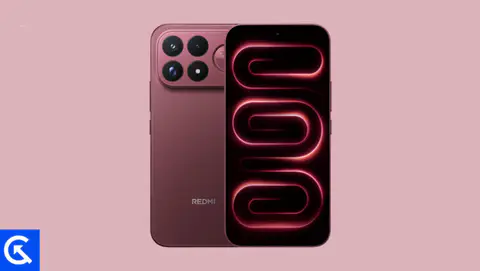
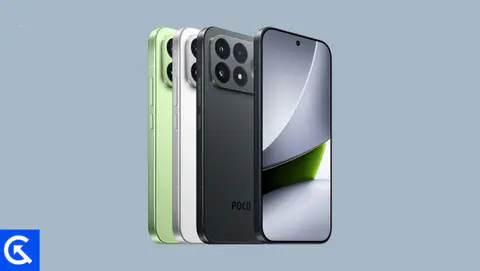
On this page, we will share all the latest Xiaomi Redmi Note 17 Pro Max 5G / Poco X8 Power (codenamed: brussels) firmware flash files. To flash the firmware file, you need the Xiaomi Mi Flash Tool, which works on Windows, Mac, and Linux. Follow this guide to flash the firmware stock ROM file on Redmi Note 17 Pro Max 5G / Poco X8 Power.

Xiaomi Poco X8 Power Device Overview:
Xiaomi Poco X8 Power is a battery-focused mid-range 5G smartphone with a 6.83-inch AMOLED display featuring a 120Hz refresh rate, Dolby Vision, HDR10+, 3840Hz PWM, and up to 3500 nits peak brightness. The Snapdragon 6 Gen 5, Adreno 812 GPU, 8GB RAM, and UFS 2.2 storage should deliver reliable everyday performance and decent gaming capabilities. Its 50MP OIS main camera supports 4K video recording, while the 32MP selfie camera also offers 4K recording. Other highlights include Dolby Atmos stereo speakers, Gorilla Glass Victus 2, IP68/IP69K protection, 3m drop resistance, and up to four major Android updates. The massive 10,000mAh battery with 100W fast charging, 27W reverse wired charging, and bypass charging is its biggest selling point.
The main drawbacks are its 229g weight, plastic frame and back, relatively slow UFS 2.2 storage, basic 8MP ultrawide camera, and lack of NFC and microSD expansion. USB 2.0 is another limitation, particularly for users who frequently transfer large files. The Snapdragon 6 Gen 5 is capable for everyday use but isn’t intended for flagship-level gaming.
Overall, the Poco X8 Power is an excellent choice for heavy users, travelers, and gamers who prioritize exceptional battery life, fast charging, display quality, and durability, but it is less suitable for users seeking flagship performance or advanced photography.
Advantages of Stock ROM:
Here are the answers to why you need to download and save the Redmi Note 17 Pro Max 5G / Poco X8 Power Stock ROM flash file on your computer.
- If your device is dead, you can unbrick using the Stock ROM file
- You can fix or repair the IMEI on your device using DB files from Stock ROM
- Remove any malware or Adware from Redmi Note 17 Pro Max 5G / Poco X8 Power
- You can fix the boot loop issue on Redmi Note 17 Pro Max 5G / Poco X8 Power
- Fix Unfortunately; the app has stopped errors on Xiaomi Redmi Note 17 Pro Max 5G / Poco X8 Power
- Fix Network related issue
- Patch Boot image to Root using Magisk
- You can unroot Redmi Note 17 Pro Max 5G / Poco X8 Power
- To Reset or Remove FRP on your device:
- Restore Xiaomi Redmi Note 17 Pro Max 5G / Poco X8 Power to Factory State
How to install Stock Firmware on Redmi Note 17 Pro Max 5G / Poco X8 Power
Before installing, follow the prerequisites and install the necessary drivers and tools on your PC.
Pre-Requisites:
- This Flash File is for Xiaomi Redmi Note 17 Pro Max 5G / Poco X8 Power.
- You should have a working Windows PC/Laptop
- Download and Install the latest Xiaomi USB Driver for Windows and MAC.
- Download and Install the Xiaomi Mi Flash tool on your PC (Fastboot Method)
- Charge your phone to at least 50% before upgrading your phone.
- Take a complete backup of your phone data
Download Flash Files
Global Stable ROM:
| Version and Download Link |
Changelog |
| OS3.0.310.0.WDRMIXM
Recovery ROM |
- System
- Fix: Occasional display errors
|
| OS3.0.308.0.WDRMIXM Recovery ROM |
- System
- Updated the security patch to August 2026. Increased system security.
|
| OS3.0.306.0.WDRMIXM Recovery ROM |
- System
- Fix: Improved system stability and user experience
- Updated the security patch to August 2026. Increased system security.
|
| OS3.0.303.0.WDRMIXM Recovery ROM |
- System
- Updated the security patch to July 2026. Increased system security.
- Camera
- New: Underwater mode allows controlling the camera using physical buttons
|
India Stable ROM:
| Version and Download Link |
Changelog |
| OS3.0.303.0.WDRINXM
Recovery ROM |
- System
- Fix: Improved system stability and user experience
- Updated the security patch to August 2026. Increased system security.
- Camera
- New: Underwater mode allows controlling the camera using physical buttons
|
Europe Stable ROM:
| Version and Download Link |
Changelog |
| OS3.0.309.0.WDREUXM
Recovery ROM |
- System
- Updated the security patch to October 2026. Increased system security.
|
| OS3.0.307.0.WDREUXM Recovery ROM |
- System
- Fix: Improved system stability and user experience
- Updated the security patch to August 2026. Increased system security.
|
| OS3.0.305.0.WDREUXM Recovery ROM |
- System
- Updated the security patch to August 2026. Increased system security.
- Camera
- New: Underwater mode allows controlling the camera using physical buttons
|
| OS3.0.304.0.WDREUXM Recovery ROM |
- System
- Updated the security patch to July 2026. Increased system security.
|
Please note that GetDroidTips cannot be held responsible for any damages, either internal or external, that may occur to your device as a result of following this guide. We advise you to proceed only if you have a good understanding of what you are doing and are confident in your ability to follow the instructions correctly. Your caution and care are appreciated.
Instructions to Flash The ROM:
To install MIUI Flash files on your Xiaomi Redmi Note 17 Pro Max 5G / Poco X8 Power, we have given two methods, either you can follow the recovery method, or you can follow the Fastboot method. A detailed guide on both methods is given below:
Guide to Install Stock ROM On Xiaomi Devices
I hope you installed the firmware file on Redmi Note 17 Pro Max 5G / Poco X8 Power (brussels) successfully; now, please rate this website with your comments. We always welcome feedback and improvements.