
If you are looking to flash stock firmware on your Galaxy devices and want some legit sources to download the Samsung firmware, then there is one tool called Frija. This tool lets you download the firmware for any Samsung device based on your country or region so that you can install it on your mobile. Moreover, you need to install stock firmware to restore your device to the factory state, fix any bugs or software issues, or even recover your device if you are stuck in a boot loop. You can make use of the Frija tool to manually upgrade or restore the stock firmware of your device.
In this guide, we will give you the links to the latest Frija Tool to download the Samsung firmware. The database of the Frija tool is very reliable and has all the latest stock firmware of the devices as soon as they are made available. You can download the firmware from the standalone Frija tool and upgrade your device manually. The tool is equipped with finding the right firmware file for Samsung devices with region codes such as BL, AP, CP, CSC, [CSC and HOME_CSC], and PIT Files.
Firmware is usually used to bring back the phone from its rooted or bricked condition to a stock ROM using flash. On the other hand, software updates are released by the smartphone manufacturer that arrives via over-the-air (OTA), and many factors influence the time it arrives on your phone. In contrast, you can download the latest available firmware update file from Frija to get your Samsung smartphone rocking the newest update without waiting for the regular updates. It is also helpful if you haven’t received the OTA update due to any XYZ reasons since you can always update to the latest firmware version by way of flashing the device.
Also Read
What is Frija Tool?
The tool was developed by XDA Senior Member wssyncmldm. To look back at the tool’s history, the tool was named Frija after the name of the wife of Odin (which is the firmware flashing tool for Samsung phones). Besides, Samfirm and Frija are two of the most reputed sources from which you can download the Frija Tool.
Difference Between Frija and Samfirm
- Frija Tool: The user interface of the tool is pretty sleek and modern and does not clutter you with options and buttons. You simply need to put in some info about your device and bang! You can download the firmware straightaway. There is a Night Mode option as well that gives you that modern app-like feel. You can even Pause/resume downloads while downloading from Frija, which is one of the features that is missing in Samfirm.
- Samfirm Tool: Samfirm works the same as the Frija tool, but one important thing is that it does not allow you to download the older version of the firmware. It presents you with the same number of options and has a basic feel for the user interface. There are no modern features like Dark Mode, etc. like the Frija tool.
Download the Latest Frija Tool
- Frija v2.0.23364.3: Frija-v2.0.23364.3.zip (Latest)
- Frija v2.0.23362.1: Frija-v2.0.23362.1.zip
- Frija v2.0.23357.1: Frija-v2.0.23357.1.zip
- Frija v2.0.23262.4: Frija-v2.0.23262.4.zip
- Frija v1.4.4: Frija-v1.4.4.zip
- Frija v1.4.3: Frija-v1.4.3.zip
- Frija v1.4.2: Frija-v1.4.2.zip
Changelog:
v1.3.0
- Fixed decryption issue for enc2 type encrypted firmware
v1.4.0
- Added error message if Microsoft Redist packages are missing
- New Settings option
- Removed support message feature and added new Issue Tracker URL
- Overall UI improvement
- Added setting to disable CRC check
v1.4.1
- Hotfix for a major issue
v1.4.2
- Improved Firmware search method
- Added support for Dual Sim model
- Added Frija usage number in About Page
- Load Samsung dll libraries in efficient way
- Fixed sub text for on/off in Settings Page
v1.4.3
- Fixed firmware lookup and download issue
v1.4.4
- Fixed an issue where if firmware paused and resumed after downloading more than 1.9 GB failed to download complete firmware
- Message box added with invite link to Frija Discord server
v2.0.23262.4
- Improved performance, better error/exception logging
- Independent of Samsung dll libraries
- Improved CRC check
- UI includes more details on Download, CRC validation and Decrypt processes
- New Fluent UI with Light/Dark and System theme support
- New Auto mode to retrieve firmware from FUS server for device connected to PC
- Frija now uses Samsung drivers instead of ADB to pull device info needed to find the firmware in Auto mode.
- Added a dialog box notifying users that firmware has been successfully downloaded.
- Mica effect on Windows 11 for both dark and light theme.
- Added many small UI improvements
- Fixes issue where Frija v1.4.4 can no longer download any firmware
v2.0.23357.1
- Fix Frija not able to retrieve firmware
- Use new SmartSwitch’s encryption keys
- Frija can pull firmware for EUX csc
v2.0.23362.1
- Fix Frija not able to retrieve firmware
- Add IMEI/SN field for firmware lookup
- Fix Device name retrieval in auto mode
- Remove Manual (Legacy) mode
- Rename Auto (Experimental) to Auto
v2.0.23364.3 (Latest)
- Make IMEI/SN as mandatory field in manual mode. Firmware cannot be retrieved without this field from Samsung FUS server
- Cache IMEI/SN field similar to Model/CSC fields for Manual mode
- Remove most of the usage of Firebase database
- Fix crash when CRC does not match for downloaded firmware
- Add Ushie as contributor
How to Use Frija Tool to Download Samsung Firmware Directly
Although there are many alternatives you can use, Frija is particularly an easy tool to use and does have the upper hand when compared to its rivals when finding firmware updates for Samsung smartphones. Here’s how you can download the latest firmware for your Samsung device using Frija.
Requirements:
Here are all the requirements for the tool to work on your system.
- Microsoft Windows 7/8/10 OS
- Microsoft .NET Framework
- Microsoft Visual C++ Redistributable
- Broadband connection or 4G
Steps to Use Frija Tool on your PC
Step 01: First of all, you need to download the latest version of Frija on your PC. We have listed the links to download as well.
Step 02: The downloaded file will be a zipped one that users will have to unzip and click on “Frija.exe” to download the app, assuming that it is connected to the internet as well.
Step 03: In case if there’s an error, check if everything is working properly. Check if you have Microsoft .NET Framework and Visual C++ Redistributable installed on your PC or not, and if not, install it.
Step 04: Once the tool is installed, open it.
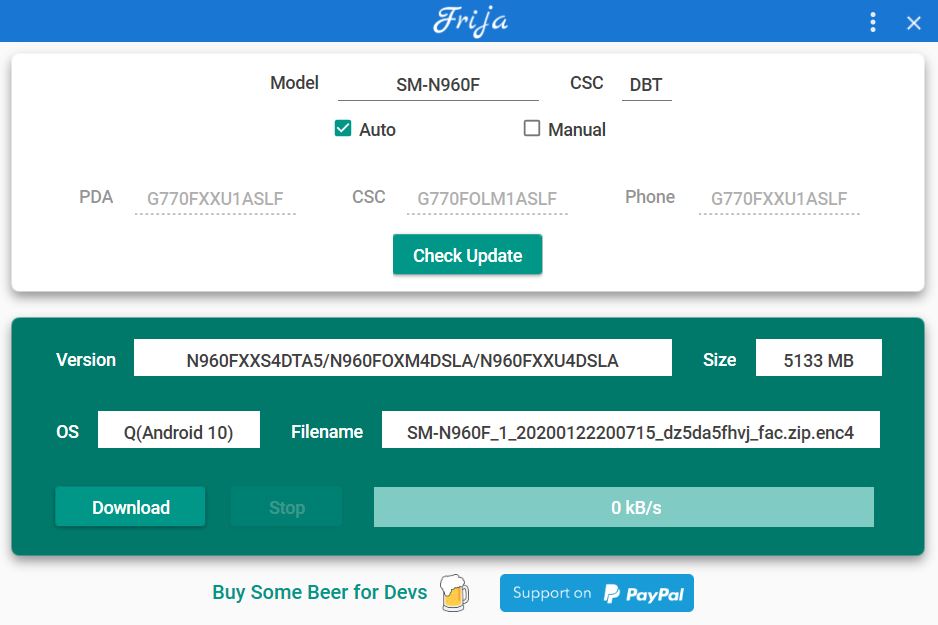
Step 05: Enter the model number of your device and region code (CSC) and, finally, tap on the ‘Check Update’ button.
Step 06: If the search query returns any results, you’ll see the latest version of the firmware available for your smartphone, size, OS, and filename, followed by a ‘Download’ button that you need to press to commence downloading.
Final Step: Once the file is downloaded, you need to unzip the file and use a flash tool to install the firmware such as Odin Flash Tool or any others.
Requirements
There are no requirements as such. However, you need to make sure that you have a Windows PC/laptop. Moreover, you need to provide the model number and CSC code of your region to download the latest firmware for your phone. You can download the below application if you are not sure about the details pf your phone:
[googleplay url=”https://play.google.com/store/apps/details?id=org.vndnguyen.phoneinfo&hl=en”]
Conclusion
If you face any issues then, you can head over to the official issue tracker to lodge your issue. So, there you have it from my side in this post. I hope you guys liked this post and understood everything about the Frija tool and downloaded the latest version of it. Let us know in the comments below if you liked this post or not. Until the next post…Cheers!
Discussion
3 CommentsGreat tip, helps a lot! Thx.
it will only download the latest, cant seem to find older versions
I’ve downloaded the firmware but I can’t unzip it. It says the “archive is corrupted”.