
Realme unveiled its new Narzo series on May 11th. The Narzo 10 series was unveiled through a pre-recorded launch video that was streamed online. This is a new budget that is presented in the Indian market.
If you are here, then you may be looking for a firmware flash file for your Realme Narzo 10A. If yes, then you are in the right place. In this guide, we will help you to flash the stock ROM file on Realme Narzo 10A by using the SP Flash tool.
We have shared all the pre-requisites files to download and install the stock ROM flash file on your device.

Realme Narzo 10A Overview:
The Realme Narzo 10A is a basic budget smartphone from 2020, built for simple everyday use rather than performance. It features a 6.5-inch IPS LCD display with HD+ resolution, which is decent for casual browsing and video watching but not very sharp by today’s standards. The design is simple with a plastic body, rear fingerprint sensor, and practical touches like a headphone jack and FM radio. It also has Gorilla Glass 3 protection and weather-sealed ports, which add some durability for daily use.
Performance is powered by the Helio G70 chipset, which was fine for light tasks like calling, WhatsApp, YouTube, and basic gaming, but it feels quite slow by today’s standards. The camera setup is very basic, with a 12 MP main sensor that works for casual shots but struggles in low light.
The 5000 mAh battery is one of its strengths, easily lasting a full day or more, though charging is slow at 10W via microUSB. Overall, the Narzo 10A is now outdated in 2026, suitable only for very light use or as a secondary phone.
Why We Need Stock Firmware?
Stock Firmware or a Stock ROM is official software that is designed by the OEM manufacturer for a particular device. This file is required to fix any software-related issue on your Realme Narzo 10A. If you are facing any problem with your device, your final attempt will be to re-install the stock ROM. This way, you can restore your device back to stock ROM. This guide will be more useful to those users who always want to try rooting, installing mods or custom ROM.
Advantages of Stock ROM:
Here are the answers to why you need to download and save the Realme Narzo 10A Stock ROM flash file on your computer.
- If your device is dead, you can unbrick using the Stock ROM file
- You can fix or repair the IMEI on your device using DB files from Stock ROM
- Remove any malware or Adwares from Realme Narzo 10A
- You can fix the boot loop issue on Realme Narzo 10A
- Fix Unfortunately, the app has stopped errors on Realme Narzo 10A
- Fix Network related issue
- Patch Boot image to Root using Magisk: Mediatek Guide or Spreadtrum Guide
- You can unroot Realme Narzo 10A
- To Reset or Remove FRP on your device: Mediatek FRP Guide or Spreadtrum FRP Guide
- Restore Realme Narzo 10A back to Factory State
Firmware Details:
- Device Name: Realme Narzo 10A
- ROM Type: Stock ROM
- Gapps File: Included
- Tool Supported: SP Flash Tool
- Processor: Mediatek Helio G70
- Android Version: Android 10
How to Install Realme Narzo 10A Flash File
Before installing the Stock ROM on your Realme Narzo 10A, you should download the firmware flash file. Then download and install the USB Drivers and flash tool on the PC as well. Once you’re done with these, you can proceed to the steps below. But let’s take a quick look at the Stock Firmware importance and firmware details below.
Pre-Requirements:
- Supported device: Realme Narzo 10A
- Make sure to charge your device more than 50%
- You need a PC or Laptop with a USB cable.
- Take a complete backup using any method given below
- Download Drivers and Tools: VCOM drivers, SP Flash Tool, and Realme USB Drivers
Download Flash Files
| Software Details | Download Link |
| Flash File Name: RMX2020_11_C.10 File Size: 6.6 GB |
Download Link |
| Flash File Name: RMX2020_11_C.08 File Size: 3 GB |
Download Link |
| Flash File Name: RMX2020_11_A.69 File Size: 3 GB |
Download Link |
| Flash File Name: RMX2020_11.C.07 File Size: 3 GB |
Download Link |
| Flash File Name: RMX2020_11.A.63 File Size: 3 GB |
Download Link |
| Flash File Name: RMX2020_11.A.61 File Size: 3 GB |
Download Link |
| Flash File Name: RMX2020_11.A.59 File Size: 3 GB |
Download Link |
| Flash File Name: RMX2020_11.A.55 File Size: 2.8 GB |
Download Link |
| Flash File Name: RMX2020_11.A.39 File Size: 2.8 GB |
Download Link |
| Flash File Name: RMX2020_11_A.33 File Size: 2.8 GB |
Download Link |
Method 1: Instructions to Install via Recovery:
First, you can try the official method to install the OTA stock ROM update via Realme device recovery.
Method 2: Instructions to Install via SP Flash Tool
Now, without wasting any more time, let’s jump into the firmware installation steps below:
- Make sure you follow and download all the required files and flash tool on your PC.
- Open the flash tool exe file to open the SP Flash Tool User Interface
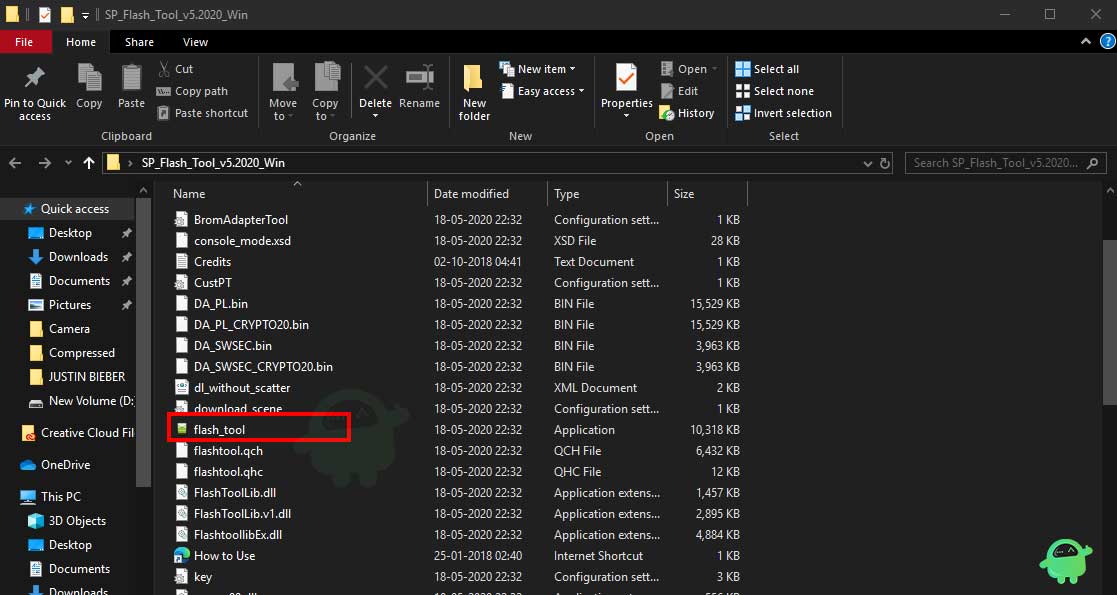
- Once your load the SP Flash tool UI, Tap on Download option
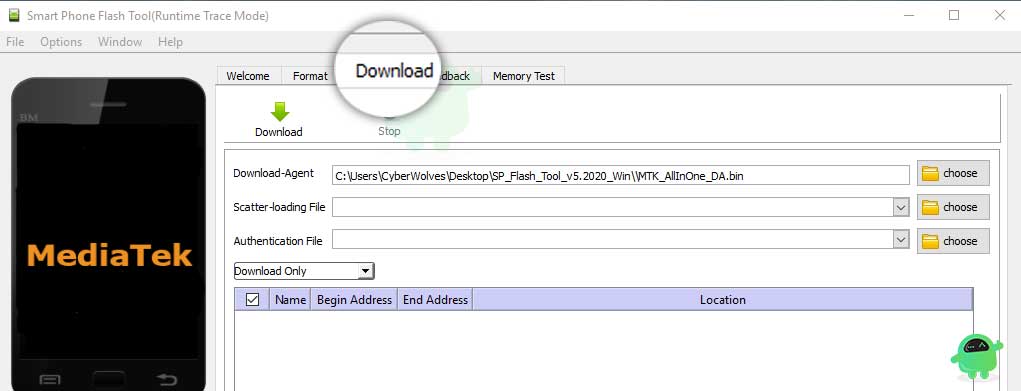
- In the download tab, you have to load both the download agent and the scatter text file in the scatter-loading section.
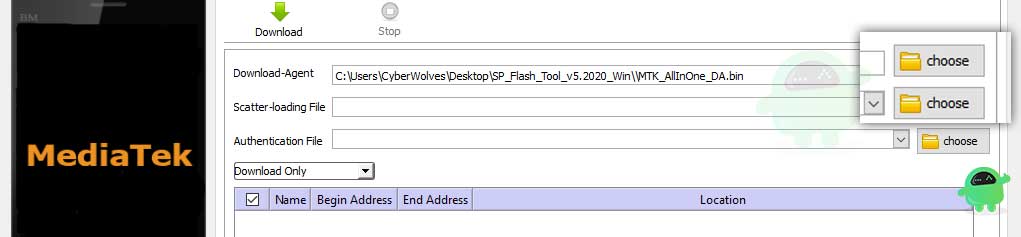
- You will find the scatter text file inside the ROM package for most cases, if not, you can create a scatter text file on your own.
- Once you load the file, click the Download button
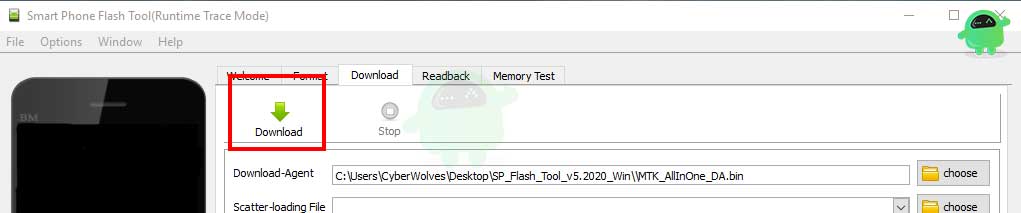
- To start the upgrade process of stock ROM on your Realme Narzo 10A, you need to turn off your device and hold the Volume Down and Volume Up key together and Connect your Phone to PC/Laptop using USB Cable (Keep the Volume Down and Volume Up button until your computer detects the phone.)
- When the phone connects, your device will start upgrading the stock firmware
- You need to wait for a few minutes to complete the upgrade process.
- Once the flashing process completes, you will find a green button which means a successful upgrade.

- That’s it! You can reboot your Realme Narzo 10A
Follow our full-depth video guide below:
Video Guide to Install Stock ROM via SP Flash Tool
That’s it, guys. We hope that you’ve installed the Stock Firmware on your Realme Narzo 10A device successfully. Feel free to ask in the comments below for any queries.