
On this page, we will guide you to install the TWRP Recovery on the Nothing Phone 3 (codename: metroid). This guide contains both written instructions and a video tutorial to help you install it quickly. Make sure to download the files required and then jump straight into instructions on how to install TWRP Recovery on the Nothing Phone 3 (metroid).
Keep in mind that before heading over to the process, you will need to unlock the device bootloader first. As smartphone OEMs provide a locked bootloader to their devices due to some security concerns, in order to install any third-party file, you will need to unlock the bootloader. Then you will be capable to install TWRP Custom Recovery on your Nothing Phone 3 device and root as well. The TWRP Recovery can also take Nandroid backups, restore, wipe out system/data/cache, and more.
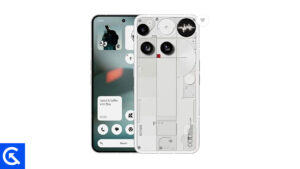
Nothing Phone 3 Device Overview:
The Nothing Phone 3 brings a bold design and serious flagship power. It keeps the signature transparent look and adds a monochrome LED matrix on the back with 489 LEDs for notifications, timers, and a unique visual identity. The 6.67 inch OLED display is sharp and smooth with 120Hz refresh rate, high 2800p resolution, and extremely bright peak output up to 4500 nits, making it excellent outdoors. Gorilla Glass protection on both sides, an aluminum frame, and IP68 water resistance give it proper flagship durability.
Under the hood, the Snapdragon 8s Gen 4 with up to 16GB RAM and UFS 4.0 storage delivers fast, stable performance for gaming and heavy multitasking. The triple 50 MP camera setup covers wide, 3x periscope telephoto, and ultrawide, with solid 4K video and OIS for stability, while the 50 MP selfie camera also supports 4K at 60fps.
Battery capacity ranges from 5150 to 5500 mAh depending on the region, supported by 65W wired charging plus wireless and reverse charging. With five major Android upgrades promised, the Phone 3 is positioned as a long term premium Android option with a distinct personality.
TWRP Recovery and its Advantages
Team Win Recovery Project is an open-source software custom recovery image for Android-based devices. It provides a touchscreen-enabled interface that allows users to install third-party firmware and back up the current system which is functions often unsupported by stock recovery images. – Wikipedia
Advantages of TWRP Recovery:
- You can flash Custom ROM on Nothing Phone 3 using TWRP
- You can flash modding zip files to customize your phone
- Easy to flash and use Xposed Modules using TWRP
- Easy to Root and Unroot using TWRP Recovery flashable zip SuperSU
- You can install Magisk on Nothing Phone 3
- Easy to Create and Restore Nandroid Backup using TWRP Recovery.
- Easy access to restore the Nandroid Backup.
- You can flash the image file using TWRP Recovery on Nothing Phone 3
- Easy to remove all bloatware using TWRP Recovery on Nothing Phone 3.
- To underclock and overclock.
- You can clean Wipe, Cache, and Data.
Steps to Install TWRP Recovery on Nothing Phone 3 (metroid)
Before going to the TWRP installation process, make sure to follow all the pre-requirements mentioned below properly.
Pre-Requirements:
- The file and guide are supported for the Nothing Phone 3 (metroid) model only. Don’t try it on other devices.
- Nothing Phone 3 bootloader should be unlocked.
- A PC/Laptop and a USB cable are required for this process.
- Make sure to take a Full Backup of Device Data (No Root).
- Charge your device battery to full.
- Download All Required Files:
- No Verity Opt Encrypt and VBMeta.img
- Download SuperSU Zip – For root using SuperSU
- Download Magisk Zip – For root using Magisk
- USB Drivers: OnePlus USB Drivers
- Download ADB and Fastboot and install them on your PC
TWRP Recovery Details
| File Name | TWRP Recovery |
| Support | Unknown |
| Version | Latest |
Disclaimer:
Install TWRP via ADB and Fastboot Tool
After downloading all the required files, drivers, and tools, follow the installation process.
- First of all, enable the Developer Options and USB Debugging mode on your device.
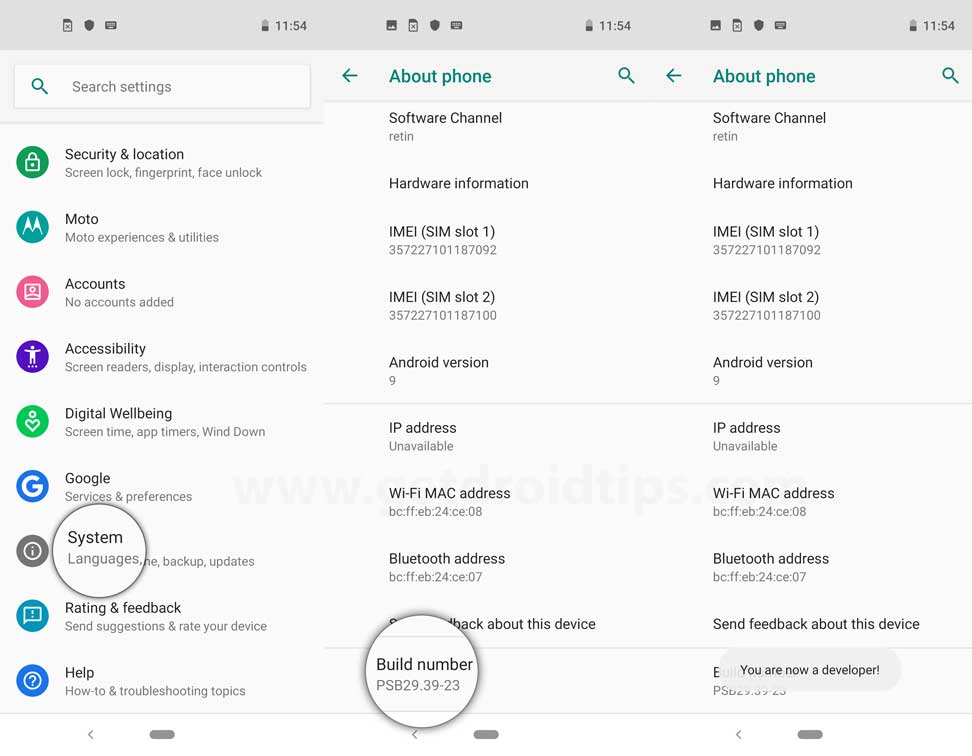
- Head over to the device Settings > System > About Phone > then tap on the Build Number seven times to enable Developer options mode.
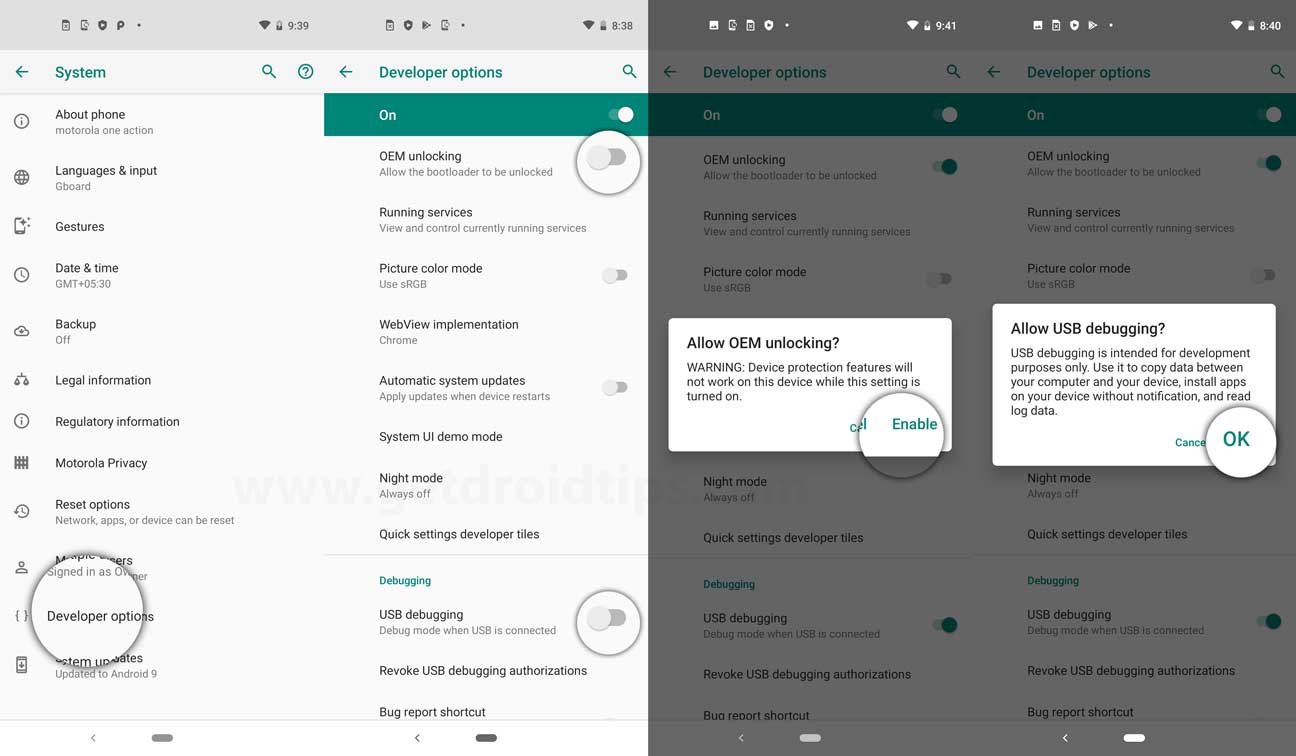
- Now, go to the Developer options in the Settings menu and turn on the toggle to enable USB debugging.
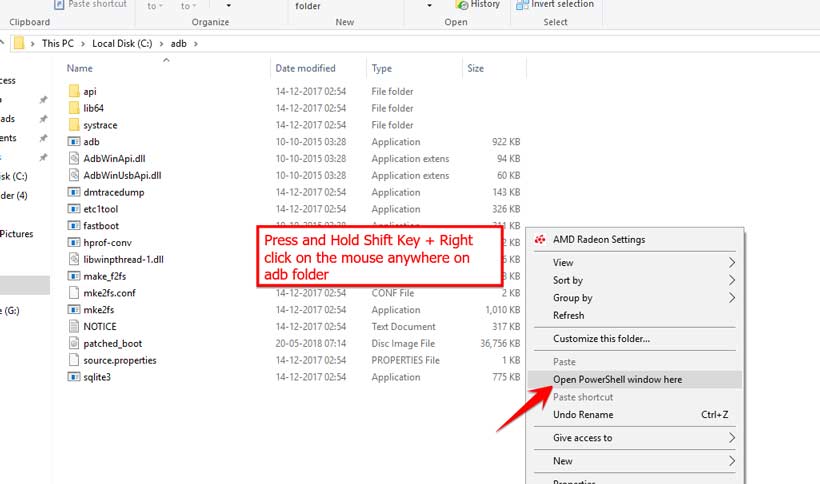
- Next, open the ADB & Fastboot folder on your computer. Then press and hold the Shift key and right mouse click to open the command window.
- Turn off your device > Press and hold the Volume Up + Power button together for a few seconds to enter into Fastboot mode.
- Connect your device with the PC via a USB cable and type the following code on the command windows and hit enter:
adb reboot bootloader
- Now, your device is connected successfully as a fastboot device.
- Type the following command and hit enter to check the fastboot device is connected or not:
fastboot devices
- Download the correct image file and copy the file into the same folder as your adb and fastboot binaries. Rename the image to twrp.img and type:
fastboot boot twrp.img
- Now, in order to install TWRP Recovery on your phone permanently, type the following command and press enter:
fastboot flash recovery twrpname.img
- To just boot, you can use the command fastboot boot twrpname.img
- That’s it. You’ve successfully installed the TWRP Recovery on the Nothing Phone 3 device. Now, you have to flash the Root.
What is Root?
Smartphone Rooting is the unofficial way to enable an administrator or superuser access to your device system and subsystem. Therefore, the user can easily tweak, change, edit, or delete system files and apps easily.
With the help of rooting, you can uninstall bloatware, increase device performance, reduce battery draining, install Xposed modules, and more. However, smartphone rooting will void the device warranty and you may not get software OTA updates anymore. An improper way of rooting can also brick your device easily. Therefore, make sure to follow the guide properly.
The advantage of Rooting:
-
- You can get access to all files on your Nothing Phone 3, even the files present in the root directory of your phone.
- You can increase the performance of your Nothing Phone 3 by overclocking.
-
- By rooting you can increase battery life by underclocking the Nothing Phone 3.
- Uninstall Bloatware on Nothing Phone 3.
- You can block Ads on any Android applications such as Youtube and other game-related applications.
Also Read: Top 5 Adblock Plus Alternatives for Android
- By Rooting Nothing Phone 3, you can View, Edit, or Delete any system file inside the root directory.
- You can install the Xposed Framework and many Xposed module support.
Steps to Root Nothing Phone 3
Guide to Root Nothing Phone 3 via SuperSU
Guide to Root Nothing Phone 3 via Magisk
We assume that this full-depth installation guide will be helpful to you. For any queries, feel free to ask in the comments below.